
S-97585- Add Reduced Regular Line Proration Table
Description
This update introduces a specialized proration table for Reduced Regular Lines (RRL), specifically for ENY Pilots. It ensures that the required number of days off for a reduced schedule is calculated accurately and matches the existing standards used for reserve lines.
New Proration Table for Reduced Regular Lines (RRL)
We have enhanced the scheduling logic for ENY Pilots to include a dedicated proration table for Reduced Regular Lines. This ensures that crew members bidding for reduced pairing lines have their minimum days off calculated according to specific "Reduced Regular Line" (RRL) requirements.
What is Changing?
Previously, reduced regular lines may not have had a specific table to define "days off" requirements based on the length of the bid period. This update adds a specialized RRL Proration Table to the Pairing-DomicileRestWithTable rule.
- Customized for ENY Pilots: This feature is specifically configured for ENY Pilot groups.
- Standardized Values: To maintain consistency, the RRL values for pairing lines will match the existing "Reduced Reserve Line" values (originally found in Appendix C).
- Period-Specific Logic: The system now includes specific parameters for both 30-day and 31-day bid periods (RRL30 and RRL31).
How It Works in the Scheduler
The PBS Scheduler has been upgraded to be "context-aware." When a pilot submits a "Pairing Bid Group (Reduced Regular Line)," the system will now:
- Recognize the specific bid group type.
- Retrieve the RRL-specific proration table instead of the standard table.
- Enforce the correct minimum number of days off for that specific reduced schedule.
Administrative Impact
- Documentation: The Rule Documentation and Configuration Spreadsheets have been updated to include a new section: "Different Reduced Regular Line Pro-ration Details."
- Automated Upgrade: An upgrade script has been implemented to automatically populate these parameters (RRL30_Default and RRL31_Default) for ENY, so no manual configuration of the base tables is required.
This update ensures that ENY Pilots on reduced schedules receive the correct, contractually-mandated number of days off while maintaining a seamless bidding experience.
Acceptance Criteria
GIVEN an ENY admin
WHEN doing a rule editor for pilots
THEN I will see the RRL proration table within the pairing-domicilerestwithtable.
GIVEN an ENY admin
WHEN doing a scheduler run for pilots and processing a reduced regular line pairing bid groups
THEN the scheduler will use the RRL proration table.
S-96245- Pilots- Golden Days
Description
We have enhanced the Reserve scheduler to support the Envoy Method of GDO allocation for Pilots. This feature automatically identifies the best locations for GDOs within a reserve line, ensuring every eligible pilot receives their guaranteed rest blocks.
Key Features of the Pilot GDO Method
- Customized Block Sizes: * Pilots will be awarded a single block of 2 consecutive GDOs.
- (For comparison, Cabin continues to receive blocks of 3).
- Universal Eligibility: Unlike Cabin, which requires a minimum number of days off to qualify, all ENY Pilots are eligible for GDO allocation, provided their schedule has at least one block of two consecutive days off.
- Intelligent Placement (Start of Block): * The system first attempts to place the GDOs at the very beginning of a block of days off.
- If you have multiple blocks of days off, your bid preferences will be used to decide which block gets the GDOs.
- Coverage Limit Flexibility: * We have introduced Coverage Limits (Max GDO Percentage). If the start of every block of days off has already reached the maximum number of GDOs allowed for the day, the system will "relax" the rule.
- In this case, the system will look for any other position in your schedule where a 2-day GDO block can be placed legally.
What This Means for You
- Fairer Distribution: The system uses a "post-process" sweep to ensure GDOs are distributed across the month without violating coverage requirements.
- Preference-Driven: While the system defaults to the start of a block, it will still respect your bid preferences to choose between different available blocks of days off.
- No Manual Intervention: Admins no longer need to manually "force" GDOs for pilots; the scheduler now handles this automatically based on the new Pilot-specific parameters.
Administrative & Technical Updates
- New Settings: We have separated the "Minimum Block Size" settings for Pilots and Cabin to ensure both groups follow their respective contract rules within the same system.
- Coverage Controls: Admins can now set a "Maximum GDO Percentage" specifically for the Envoy method to manage daily staffing levels effectively.
- Compliance: Pre-awarded GDOs and Vacation GDOs are excluded from coverage limit counts, ensuring contractually protected days are never blocked by the new logic.
This enhancement provides ENY Pilots with a more predictable and automated way to secure their Guaranteed Days Off while maintaining operational coverage.
Acceptance Criteria
GIVEN any ENY admin
WHEN doing a scheduler run for cabin with max gdo percentage set to 100% & doing reserve gdo allocation
THEN reserve gdo allocation will behave in exactly the same way as existing functionality ( including giving one block of three days gdo to qualifying people).
GIVEN any ENY admin
WHEN doing a scheduler run for pilots and doing reserve gdo allocation
THEN reserve gdo allocation will behave similar to the cabin version except the following points:
- It will award one block of two days to qualifying people
- All pilots will qualify for GDOs (regardless of how many days off they get)
- Any person who qualifies for GDOs and has at least 1 position where they can be given their single block of GDOs at the start of a block of days off (i.e. none of those days have hit their coverage limit based on the Maximum GDO Percentage run parameter), then that person will be forced to take their single block of GDOs at the start of a block of days off. (Bid preferences will then be used to choose if there are different options).
- Any person who qualifies for GDOs but does not have at least 1 position where they can be given their single block of GDOs at the start of a block of days off (i.e. at least 1 day in each of those blocks has hit its coverage limit based on the Maximum GDO Percentage run parameter) will then be allowed to take their single block of GDOs anywhere. (Bid preferences will then be used to choose if there are different options). But note that it must still be a single block of consecutive GDOs (2 for Pilot, 3 for Cabin). If there is still no position available for a single block of consecutive GDOs, then the person will not be given any GDOs.
S-96239- Pilots-FARS 117 25b
Description
We have introduced a new bidding option specifically for Pilots that allows for reduced rest requirements within a 7-day look-back period, providing more opportunities to be awarded preferred pairings while remaining fully compliant with FAR 117 regulations.
What is changing?
Under standard FAR 117.25b rules, pilots are typically required to have a 30-hour rest period that, when combined with a 18-hour buffer, totals 48 hours of rest in a 7-day window.
With this new update, you can now choose to "waive" that total rest requirement down to 36 hours (the base 30 hours plus a reduced 6-hour buffer).
How to use it
In the WebApp, you will see a new option in the Waive Bids section of your Pairing Bid Group:
- Waive Bid Syntax: "Waive 48 hours in 7 days to 36 hours"
How it works in the Scheduler
- Default Setting: If you do not select this waive bid, the system will continue to enforce the standard 48-hour rest requirement.
- Waiver Selected: When the waive bid is active, the system automatically swaps the 48-hour rule for the 36-hour version. This allows the scheduler to consider pairing combinations that would have previously been flagged as illegal due to the higher rest buffer.
Administrative & Technical Details
- Configuration: The Far_117_25b rule now exists in two instances within the system logic—one with a 1080-minute (18hr) buffer and one with a 360-minute (6hr) buffer.
- System Integrity: This change includes an upgrade script and updated configuration spreadsheets to ensure that the transition between these two rule states is seamless and accurately logged.
Acceptance Criteria
GIVEN a ENY Admin
WHEN viewing the rule editor for pilot rules
THEN I will see 2 instances of FARS 117.25b
1-Buffer rest minutes 1080, rule mode remove, bidkey FortyEightHoursInSevenDaysToThirtySixHours
2-Buffer rest minutes 360, rule mode add, bidkey FortyEightHoursInSevenDaysToThirtySixHours
GIVEN an ENY Pilot Bidder
WHEN viewing waive bid options in a pairing bid group
THEN I will see the new waive bid "Waive 48 hours in 7 days to 36 hours"
GIVEN an ENY admin
WHEN doing a pilot run
THEN the scheduler will enforce the FARS 117.25b with the appropriate buffer, depending on whether the waive bid is used
S-96238- Pilots-Implement standard configuration
Description
See attached config sheet:
https://docs.google.com/spreadsheets/d/1vh707nWKynwG9LmbBRpZGwEYervNh0ng/edit?gid=1413109018#gid=1413109018
Update baseline config files
- PbsSettings: Edit all highlighted in yellow
- RuleConfig: Add a new rule set for ENY Pilots
- UserTypeOptions: Edit all highlighted in yellow
- CategoryOptions: Add a new pilot config set
- BaseInfo: No changes
- BaseCrudInfo: Add info item for Pilots
- ReportTemplates: Edit all highlighted in yellow
Upgrade Script will include:
Adding the new rule set
Adding the new info item
As a part of this task-please update the master config spreadsheet
Also as part of this story, we will remove the 4 items with "BlankLine" from dal/Translations.xml and put those translations in common/Translations.xml (so that all 6 items related to BlankLine now include the word "Monthly" and so that there are no Delta-specific translations related to "BlankLine".
Acceptance Criteria
Given a ENY admin
When editing the config
Then I will be able to add a pilot crew classification
AND
Then I will be able to add a pilot category using the pilot crew classification
AND
Then I will be able to use the pilot rule set for that category
AND
Then I will be able to use the pilot config set (bid set) for that category
AND
Then I will be able to add a bidder to the category
AND
Then I will be able to enter into the bidder UI
AND I will see the relevant info items
AND I will be able to enter bids & submit for that pilot bidder
Given a ENY admin
When doing a run
Then I will have successful run
Specific Testing for "Reduced Regular Line":
GIVEN a ENY pilot bidder
WHEN adding a new bid group
THEN I will see the option for "Pairing Bid Group (Reduced Regular Line) " and be able to enter and submit this bid group
GIVEN a ENY admin
WHEN launching a run
THEN I will see the following run parameters related to Reduced Regular Lines:
- Max Reduced Regular Lines
- Normal Reduced Regular Line (window)
- Min Credit Reduced Regular Line (window)
- Max Credit Reduced Regular Line (window)
- Max Min Credit Reduced Regular Lines Honored
- Max Max Credit Reduced Regular Lines Honored
GIVEN a ENY admin
WHEN viewing the dynamic stats report for a run
THEN I will see the statistics "ALV - Reduced Regular Line" and "ALV - Non Reduced Regular Line"
GIVEN a ENY admin
WHEN viewing the stats report for a run
THEN I will see the statistics "ALV - Reduced Regular Line" and "ALV - Non Reduced Regular Line" (In "Eligible Bidders Excluding Shadows" section) and I will see the "Reduced Regular Line Employees" section
Specific Testing for "Blank Line":
GIVEN a ENY pilot bidder
WHEN adding a new bid group
THEN I will see the option for "Award Monthly Blank Line" and be able to enter and submit this bid group
GIVEN a ENY admin
WHEN launching a run
THEN I will see the run parameter "Max Monthly Blank Lines Honored"
GIVEN a ENY admin
WHEN viewing the dynamic stats report for a run
THEN I will see the 3 statistics related to Blank Lines: "Bidders with Blank Line", "Total Credit On Blank Lines" and "Total Block On Blank Lines".
S-97584- Red Eyes-Import
Description
We have implemented a specific formula to automatically flag Redeye flights for ENY. This ensures that any flight operating during the early morning hours is correctly identified according to ENY’s specific operational standards.
What is considered a "Redeye"?
For ENY, a flight is flagged as a Redeye if it touches the window between 02:00 and 03:59.
How the system calculates it
The system uses a precise formula based on the Departure and Arrival times to determine if a flight segment fits the Redeye criteria:
- The Window: The system checks if the flight is active between 02:00 and 03:59.
- The Logic:
- If the flight arrives after 02:00, the system then checks the departure time.
- If that flight also departed at or before 03:59 (including flights that took off the previous evening), it is officially flagged as a Redeye.
- If the flight arrives before 02:00 or departs after 03:59, it is not considered a Redeye.
Why this matters
- Bidding Transparency: You can now easily identify which pairings contain Redeye flights during the bidding process.
- Filtering: This flag allows for future enhancements, such as filtering your pairing view to include or exclude Redeye flights based on your personal preference.
- Automation: This logic is built directly into the pairing import, meaning no manual flagging or separate files are required to maintain accuracy.
Acceptance Criteria
GIVEN an ENY pairing contains a red eye leg
WHEN it's imported into the system
THEN it should be visible in the bid analyzer as matching a red eye bid.
S-96642- Pilots - Export RES CM
Description
Create another export format=CSV where we can export the RES CM with RAPS (Reserve Availability Period) so they can identify
This will be found in the export of each category
Naming of report: Reserve Crew with RAPS
Employee ID
Employee Name
RAP (Reserve Availability Period)
Acceptance Criteria
Given a ENY Admin
When viewing an export (output) for a category
Then I will see the new CSV for Reserve Crew with RAPS
Given a ENY Admin
When viewing the new CSV for Reserve Crew with RAPS
Then I will see the report with the following information:
Employee ID
Employee Name
RAP (Reserve Availability Period)
S-96241-Pilots - New Rule - Max Block In Period
Description
We have implemented a new scheduling constraint, MaxBlockInPeriod, to automatically monitor and limit the total block hours assigned to a crew member during a specific bid period. This ensures compliance with contractual or regulatory limits regarding total flying time.
How it Works
The system calculates the total "block time" (the time from gate departure to gate arrival) for all flying legs within the current bid period.
- Configured Limit: The default limit is set to 91 hours (5,460 minutes) per period.
- Time Zone Standard: All calculations are performed based on your base time zone.
- Handling Cross-Period Flights: To ensure pinpoint accuracy for flights that span the beginning or end of a month:
- Start of Period: If a flight begins in the previous period and ends in the new one, the system only counts the portion of the flight that occurs after midnight on the first day of the new period.
- End of Period: If a flight begins in the current period but ends in the next, only the portion of the flight occurring before midnight on the last day of the period is counted.
Key Benefits
- Automated Compliance: The scheduler will automatically prevent awards that would cause a crew member to exceed the 91-hour threshold.
- Clear Feedback: If a bid group is unable to award a pairing due to this limit, the system will provide a clear reason in the results: "Violates Max Block In Period."
- Precision: By calculating "pro-rated" time for flights crossing midnight, the system ensures that every minute of block time is accounted for in the correct month.
Administrative Updates
- Rule Editor: Admins can now find and adjust the MaxBlockInPeriod rule directly within the Rule Editor.
- Documentation: The Rules Reference Manual and Configuration Sheets have been updated to reflect this new logic.
- Validation: Comprehensive unit tests have been included to ensure the logic handles edge cases, such as international date lines and varying month lengths, with 100% accuracy.
This rule provides an essential safeguard to manage crew fatigue and ensure flying hours are distributed according to your specific guidelines.
Acceptance Criteria
GIVEN an ENY admin
WHEN viewing the rule editor
THEN there is a new rule visible called MaxBlockInPeriod with a parameter BlockMinutes configured to be 5460
AND
WHEN completing a run
THEN there cannot be more than the configured block time in the period
S-97462-Pilots - Rest After Consecutive Split Duties, 1 Calendar Day Off-Parameter 3 Calendar Days Off
Description
This update enhances the flexibility of the "Rest after consecutive split duties" rule by allowing different requirements for the amount of time off required following a series of split-duty shifts.
Enhanced Rest Requirements After Consecutive Split Duties
We have updated the "Rest after consecutive split duties" pairing rule to support a new configurable parameter: NumRequiredDaysOff. This allows the system to enforce a specific number of calendar days off once a crew member has completed a sequence of split-duty pairings.
What is Changing?
Previously, the amount of rest required after consecutive split duties was often hardcoded or standardized across all groups. This update introduces the ability to customize this rest period based on the specific needs of different crew types or airlines.
- New Parameter: NumRequiredDaysOff defines exactly how many days of rest must follow the consecutive split-duty sequence.
- Standard Setting: For most existing users, this parameter is set to 1 day, maintaining current operations.
- ENY Pilot Setting: Specifically for ENY Pilots, this parameter is now set to 3 days, ensuring a longer recovery period after a series of split duties.
How it Works in the Scheduler
The PBS Scheduler now checks for this specific parameter when evaluating your line. If you complete the maximum allowed number of consecutive split duties, the system will automatically block out the required number of subsequent days (1 or 3, depending on your configuration) to ensure you receive the mandated rest before your next assignment.
Administrative & Documentation Updates
- Automated Upgrade: An upgrade script has been deployed to automatically apply the correct default values (1 or 3) to your existing rule configurations, requiring no manual setup by Admins.
- Updated Documentation: * The Rules Reference Manual has been updated to explain the logic of this new parameter.
- The Configuration Spreadsheet now includes a dedicated column for NumRequiredDaysOff.
- Reliability: New unit tests have been added to the system to verify that the scheduler correctly enforces both the 1-day and 3-day rest requirements across all bidding scenarios.
Acceptance Criteria
GIVEN an ENY admin
WHEN viewing the rule editor for pilots
THEN I will see the new parameter "NumRequiredDaysOff" for the pairing rule rest after consecutive split duties with value "3"
GIVEN an admin for an ALC other than ENY who has this rule (EG, QXC, UCA)
WHEN viewing the rule editor
THEN I will see the new parameter "NumRequiredDaysOff" for the pairing rule rest after consecutive split duties with value "1"
S-96243-Pilots -Exports
Description
This update standardizes the look and feel of reserve award exports for ENY Pilots, aligning them with the established format used for Flight Attendants while ensuring the correct data types are reported for Guaranteed Days Off (GDOs).
Standardized Reserve Award Export for Pilots
We have updated the export logic for ENY Pilot awards to ensure consistency across the fleet. This change simplifies the visual representation of reserve lines in exported reports and correctly identifies Pilot-specific day types.
What is Changing?
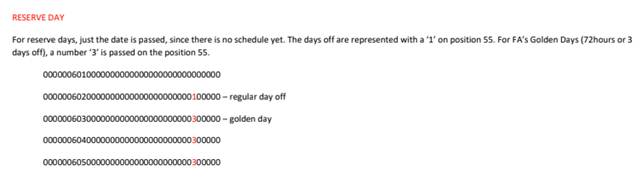
- Simplified Visuals: When exporting Pilot awards, the system will no longer include "reserve coloring." Instead, it will export a clean reserve block, matching the streamlined functionality currently used for Flight Attendant exports.
- Correct Day Type Identification: We have updated the reporting generator to distinguish between Crew Types.
- Flight Attendants will continue to show their specific day type (indicated as '3').
- Pilots will now correctly output their specific day type (indicated as '2') for Reserve GDOs.
Why This Matters
- Uniformity: By aligning the Pilot and Flight Attendant export formats, we provide a more consistent experience for Admins and Crew Planners who review these files.
- Data Accuracy: Ensuring that Pilots are identified with the correct numeric day type in the background report code prevents data conflicts in downstream payroll or scheduling systems that rely on these exports.
- Cleaner Reports: Removing unnecessary "coloring" in the export file results in a cleaner, more professional document that focuses on the core award data.
Technical Details
This change was implemented within the EnyReport generator. The system now performs a real-time check of the Run Category (Pilot vs. Flight Attendant) during the report generation process to ensure the appropriate codes are applied to the export file automatically.
Acceptance Criteria
GIVEN - A ENY admin
WHEN - exporting a run for ENY pilots
THEN - the export will match the current ENY functionality except for days with reserveGDOs ( RGO )
&
THEN for days with reserveGDOs a "2" will be exported for pilots whereas for Cabin it's currently "3" and will remain "3".
S-96242-Pilots - Change in Syntax on Bidder UI from Seniority to “Bid Seniority” Number
Description
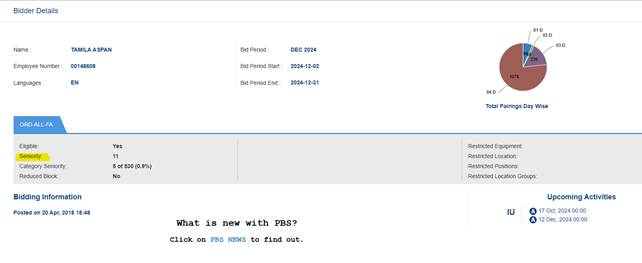
The story aims to change syntax on the Bidder UI Info tab from Seniority to “Bid Seniority Number" for ENY bidders.
Acceptance Criteria
GIVEN an ENY Pilot Bidder
WHEN viewing the information tab on the bidder UI
THEN I will see Bid Seniority Number, and NOT Seniority
GIVEN a ENY FA Bidder
WHEN viewing the information tab on the bidder UI
THEN I will still see Seniority-not Bid Seniority
GIVEN a other bidder than ENY Pilot/FA
WHEN viewing the information tab on the bidder UI
THEN I will see Seniority NOT Bid Seniority Number
.