
D-49485-Community - 'Hamburger' Menu is Missing for the Second and Subsequent Selected Lines
Description
We've resolved a bug (a regression from a previous release) that prevented the Analyzer tool from activating correctly when you selected two or more lines of text.
- The "hamburger" menu that appears after selection now correctly applies the Analyzer to all selected lines, not just the first one.
(Note: The remaining related item from our internal ticket D-49385 will be addressed in a story not defect.)

Resolution Details
We have implemented a fix in the Bids tab to address an issue where the bidline was selected but the associated action menu (the "hamburger" icon) was hidden. This occurred during the initialization routine because the internal selection marker was not completely reset before selecting the line; only one of the two necessary values was cleared. We have now corrected this by ensuring both marker values are properly cleared, which allows the bidline to be selected correctly and ensures the "hamburger" menu is displayed as expected.
D-49341-Community - Pairing Filter 'Duty On' Cannot be Updated When Sidebar Was Changed Before
Description
There is an issue with updating the filter 'Duty on' when User changes the sidebar and comes back Pairings page:
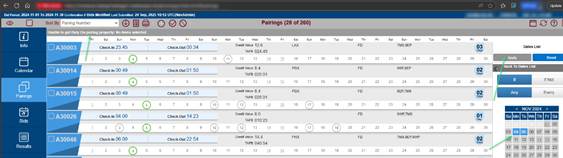
and console shows issue related to forEach function:
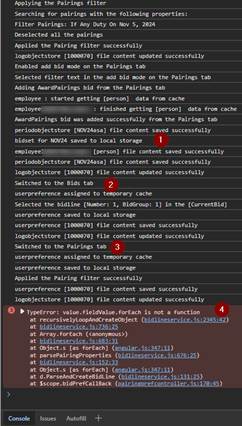
Notice:
Issue exists on Production versions, verified for ASA:
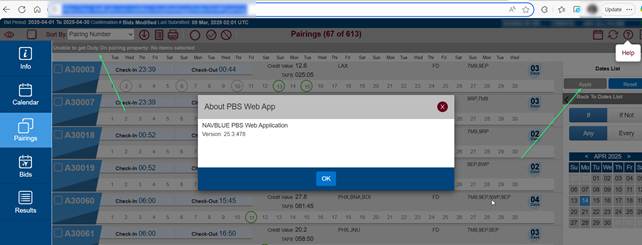
Resolution Details
Resolved a bug where single-date filters were incorrectly converted from an array to a single date object when the filter was reloaded from browser storage. This ensures the filter object is correctly reconstructed, preventing errors upon returning to the page. Single-date filters now reliably persist and load correctly after leaving and returning to the page.
D-48870-Community - The Bid Analyzer is Not Showing Results When Additional Bid Line is Added from the Pairing Tab
Description
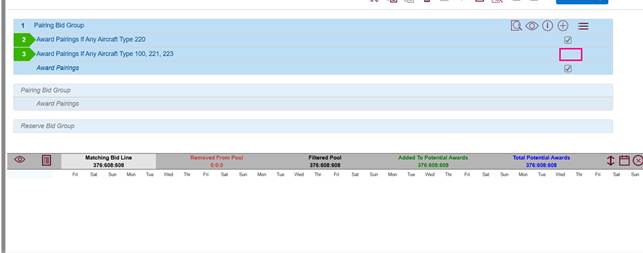
We fixed an issue where the Bid Analyzer failed to include newly added bid lines from the Pairing tab in its calculations. Now, any bid line you add from the Pairing tab will be automatically marked and included, ensuring the Analyzer provides complete and accurate results immediately.
Resolution Details
Bid lines added via the Award/Avoid buttons in the Pairing tab are now immediately and correctly reflected in the Bid Analyzer. We've added proper internal signaling to ensure the Analyzer updates instantly and includes the new line in its calculation (with the checkbox marked).
D-49136-Community -Training - Number of All Trainings is Incorrect When Filter is Used
Description
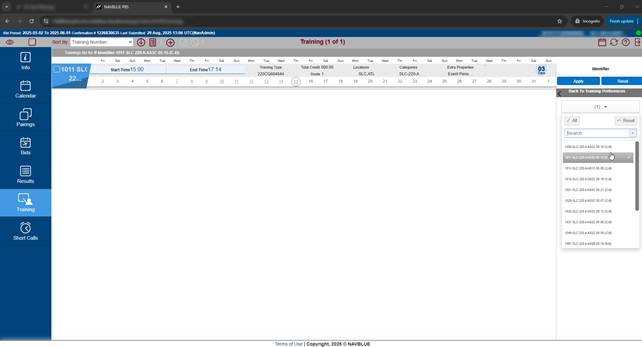
The number of all trainings is incorrect when filter is used and it is equal to the number of filtered trainings.
Example of selecting 1 training of 15 ones that are available:
Resolution Details
We've resolved an issue where the displayed total number of training sessions could be incorrect after applying certain filters. The system now updates the count at the correct point in the process, ensuring the displayed total always accurately reflects the sessions currently visible.
D-49407-Community - Waive/Set Condition Bid Line is Not Added on Top When Award is on Top and Prefer Off/Avoid/Award is Next
Description
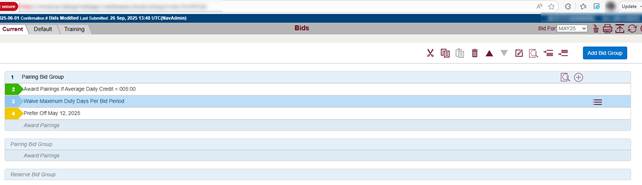
Waive bid line is not added on top:
Resolution Details
We've resolved an issue that occurred when you were editing or adding Bid Lines where an Award Pairings Bid Line was the first line listed. The system now correctly accounts for the precedence level of the Award Pairings line, ensuring new and edited bid lines are inserted at the expected index (position) in your bid list.
D-48071-Community - Unable to Generate Combined Run Report
Description
Unable to generate a combined run report on customers other than DAL

It is trying to locate the report template that is only available for DAL
Resolution Details
We've refined the process for generating the combined report. The system will now check to ensure the Short Call feature is enabled for your account before including its data in the report. This prevents potential errors and ensures the generated report is accurate based on your activated features.
D-48137-Community - Menu Icon for Selected Bid Line is Not Displayed (Hamburger Icon)
Description
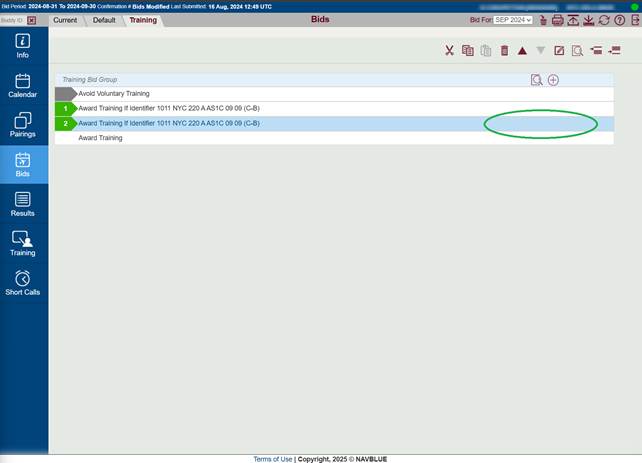
Menu icon for selected Bid line is not displayed (hamburger icon) after adding a newadding new Bid from Training page.
Resolution Details
We resolved an issue that occasionally prevented the action menu (the "hamburger" icon) from appearing or remaining visible on a selected line. The menu now displays consistently on the line you select, allowing for quick access to its actions.
D-47904-Community - Analyzer Lists Improper Number of Matching Bid Lines
Description
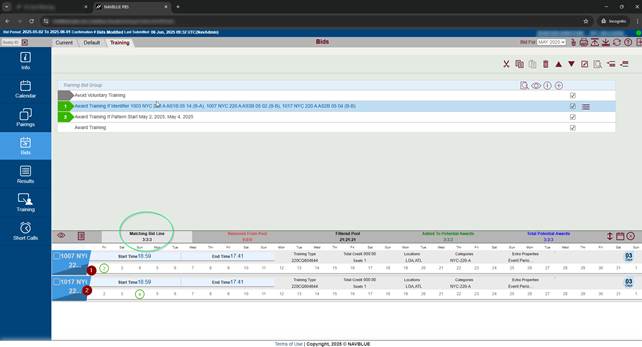
An issue related to creating bid lines in the Bids page after using the Training page. The Analyzer lists an improper number of matching Bid lines.
Resolution Details
The training filter settings from the Training page are no longer incorrectly applied to the Bids page and the Trainings tab within the Analyzer. This ensures that the Analyzer provides a complete, unfiltered view of training matches during bid analysis.
D-47884-Community - Analyzer Window Disappears and 2 Training Bid Lines are Selected
Description
Adding a new Bid line from the Training page, while the Analyzer window is open, causes the Analyzer window to be closed and two Bid lines to be selected in the Training Bid Group.
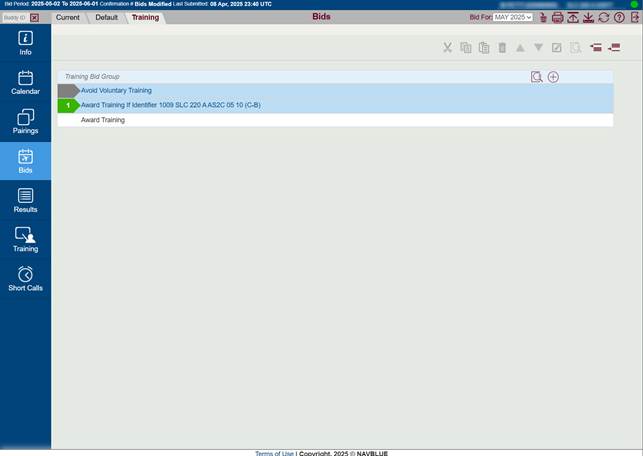
Resolution Details
The system now properly selects bid lines that originate from the Training page, resolving an issue where the Analyzer would fail to execute due to invalid arguments. The Analyzer now runs successfully with accurate data for these lines.
D-48060-Community - Analyzer Window Doesn't Close and Show Zero Values
Description
Analyzer window doesn't close and show zero values after selecting any another line - values don't refresh until Analyzer window reopen.
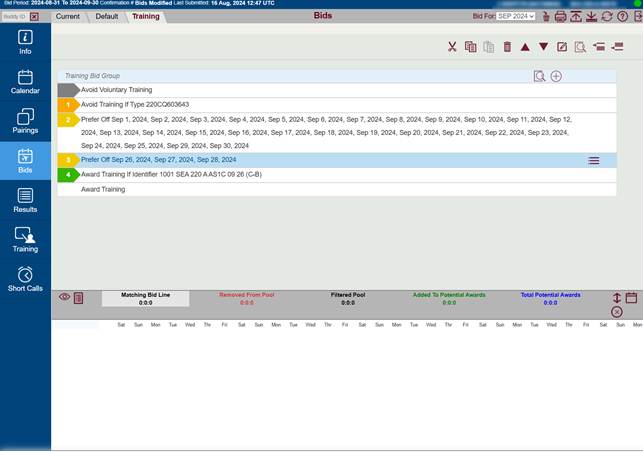
Resolution Details
Resolved a bug by changing the variable type used for the selected Bid Group and removing an unnecessary, improperly used function that incorrectly updated the selected line number. This ensures correct tracking and display of the selected line within bid groups.
D-47934 Community - Awarding via Selection is Blocked by Enabled Filter Award Check Box
Description
The Award action is blocked when selecting an item from the list in the Pairing, Training, or Short Call (DAL) tabs.
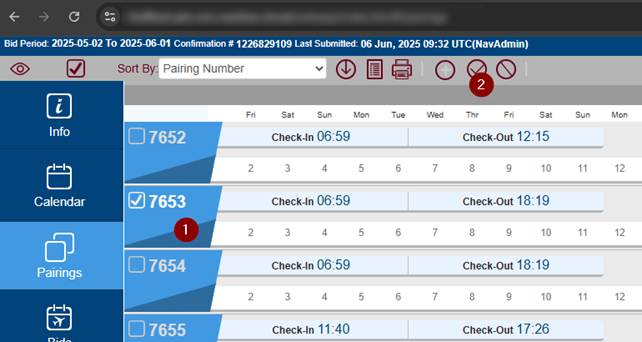
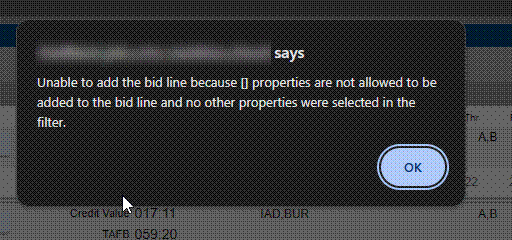
It is because there was a filter awarding and the check box is still enabled
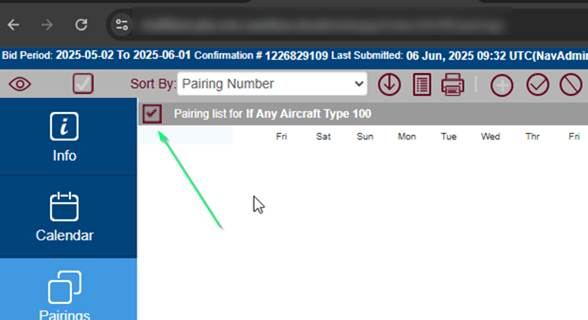
When Employee opens again filter adding mode and unclick the box the awarding of selected item (Pairing, Training or Short Call) can be done
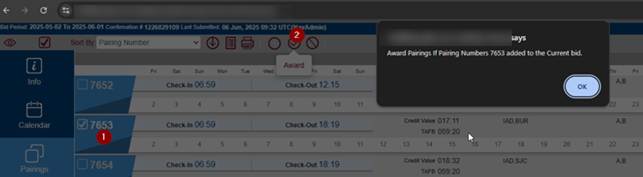
Resolution Details
We've enhanced the functionality of filter checkboxes in the Training, Pairing, and Short Call tabs.
- Previously, clicking the Reset button only toggled the filter state.
- Now, clicking Reset properly disables the filters, ensuring they are entirely cleared as expected.
D-48716 Community – Bid Group - Set Condition (Without Set Precedence) Cannot be Inserted Above Prefer Off or Avoid Line
Description
We've enabled the ability to directly insert Set Conditions (without precedence) immediately above Prefer Off or Avoid lines within Bid Groups. This new insertion method aligns with the behavior of the existing Up/Down arrow movement feature.
Resolution Details
We've improved the logic for determining where a new bid line should be inserted. The system now correctly checks the index (position) of Prefer Off and Avoid bid lines—while respecting the placement of any preceding Set Conditions to ensure new lines are always inserted at the expected and correct position.
D-47835 Community – Double Space in IF/IF NOT and ANY/EVERY Filter Name Displayed on the Pop-up
Description
When the filter is created with IF/IF NOT ANY/EVERY, there are two spaces in message displayed:
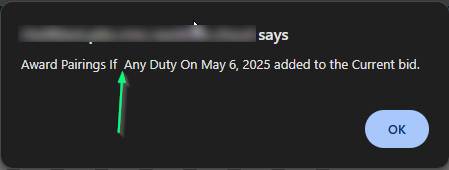
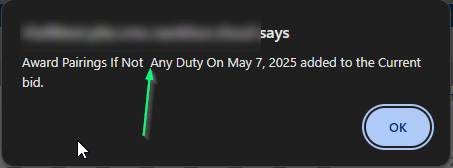
Resolution Details
Refined the underlying text formatting logic, resolving instances where unnecessary double spaces were generated.
D-47899 Community - Infinite Loading Icon After Adding New Bid Line with Open Analyzer
Description
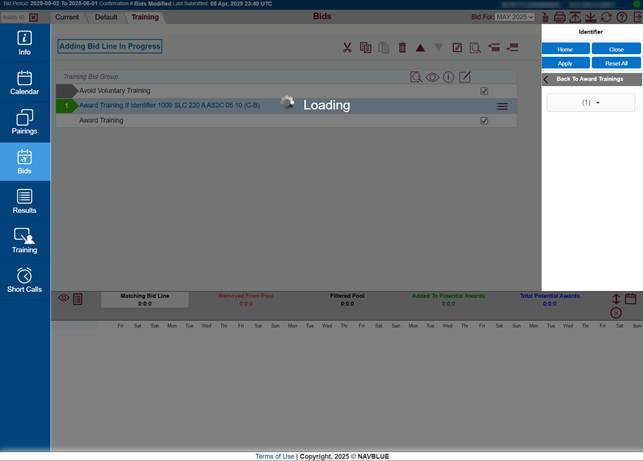
An issue that caused the application to freeze (showing an infinite loading icon) when a new Bid line was added while the Analyzer window was open but no lines were selected for analysis.
Benefit: Users no longer need to refresh the page after this specific action.
Resolution Details
Resolved Application Freezing: We fixed a bug in the bid controller logic that was causing the application to become completely unresponsive during specific bid operations, due to the application not returning a specific value.
D-48628 Community - Mismatch with Forget Line Bid Between Admin UI and Web App
Description
Improved Bid Line Accuracy: Fixed an issue where the Forget Line value could display differently in the Admin UI compared to the web application. This ensures consistent and accurate referencing when using multiple bid groups.
Applies to: Users working with complex bid structures and the Forget Line feature.
Resolution Details
We refined the workflow for modifying and generating bid lines to prevent data conflicts and maintain the correct sequencing of "Forget" and "Redo" actions, ensuring consistent results.
D-47836 Community - New Bid Line Added from Training Page is Selected but Menu Options are Disabled
Description
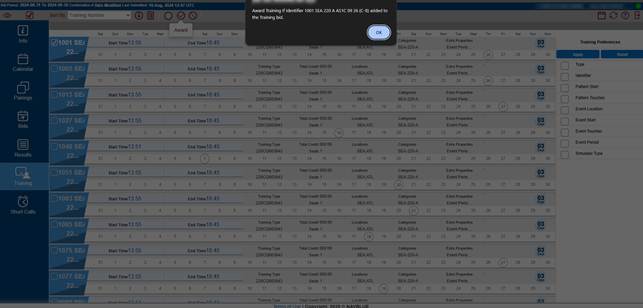
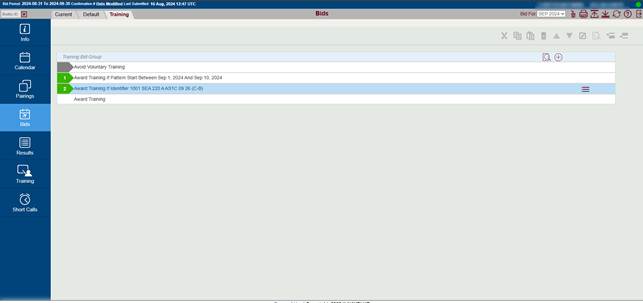
New Bid line added from Training page is selected but menu options are disabled
Resolution Details
When adding a new Bid from the Training page, the application now correctly updates the selected bid line number, ensuring a smooth and accurate flow as you continue your work.
D-48534 Community – Ordering Problems Related to Bid Lines
Description
This release includes several crucial fixes related to the ordering, insertion, and deletion of bid lines, particularly within the Training page and complex Bid Group scenarios.
We have addressed several issues to ensure bid line creation and manipulation behave consistently and correctly:
- Fixed Application Instability: Addressed the core problems originally covered by D-48125, D-48462, and D-48538, resolving various inconsistencies in bid line ordering and processing.
- Corrected Bid Insertion Logic: The following scenarios, which previously resulted in incorrect line placement, have been fixed and now function as expected:
- Using "Insert Above" on the first line (such as an Avoid or Prefer Off line) now correctly places the newly inserted line (e.g., Award, Prefer Off) in the position above the selected line.
- Set Condition lines now insert and paste in the correct relative position when interacting with Award and Avoid lines (e.g., using "Insert Above" or "Insert Below").
- Corrected the issue where certain Set Condition lines (like Maximum Days On In Row) could only be cut-and-pasted but not moved using the arrow-down function below an Award line.
- Prevented Deletion of System-Generated Lines: The system-generated "Award Training" line on the Training tab can no longer be accidentally deleted, which previously prevented the submission of bid lines.
Known Issues (Affecting Reserve Bid Groups)
The following issues related to Bid Group ordering remain and are under review. These inconsistencies are present in the current UAT environment and are not a regression caused by the recent code changes:
- Insertion Below Set Condition: In a Reserve Bid Group, Prefer Off or Award Reserve lines cannot be inserted above a Set Condition line when it is the first line in the group using the "Insert Above" button (though moving with the Arrow Up function is still possible).
- Incorrect Paste Location: When cutting and pasting a Set Condition line at the end of a Reserve Bid Group, it may incorrectly place the line after an existing Prefer Off line, or occasionally over a "short call" line, rather than at the very end.
- Prefer Off Jumps to Top: When adding a new Prefer Off Bid Line (especially after adding Award and Avoid bids), the new line incorrectly jumps to the top of the list instead of being added to the end.
Resolution Details
Enhanced Bid Line Ordering: We implemented changes to properly respect Bid Line Precedence during all common operations (adding, deleting, and copy/pasting). This ensures that bid lines are always kept in the correct, required order, even when working with special lines like Short Call. Your bid groups will remain structurally correct and valid without manual reordering.
D-49155 Community - Pairing Bid group - Positioning Set Condition with Set Precedence (Goes on Top) is Related to Presence of Set Condition without Set Precedence
Description
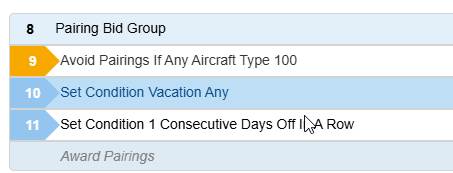
Corrected Set Condition Placement in Pairing Bid Groups: When adding a new Set Condition line with set precedence (e.g., Vacation Any) to a Pairing Bid Group, the line is now correctly inserted according to its precedence rules. This prevents it from incorrectly being placed over a lower-precedence Set Condition line that lacks explicit precedence settings. Ensures that high-precedence conditions are always ordered correctly in your bids.
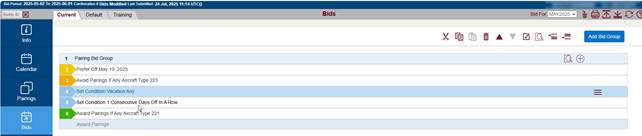
A similar situation takes place when editing the line (Set Condition, Wave, Prefer Off, Avoid or Award) and we make it Set Condition with set precedence. Then line is added next to to Set condition without set precedence:
Resolution Details
The solution was to add 0 (FALSE) precedence level for Bid lines that don't have it: Prefer Off and Avoid Pairings.
D-48728 Community - Reserve Bid Group - Prefer Off Line Can Be Inserted Above Set Condition with Precedence 2 (Forced to Extreme Top)
Description
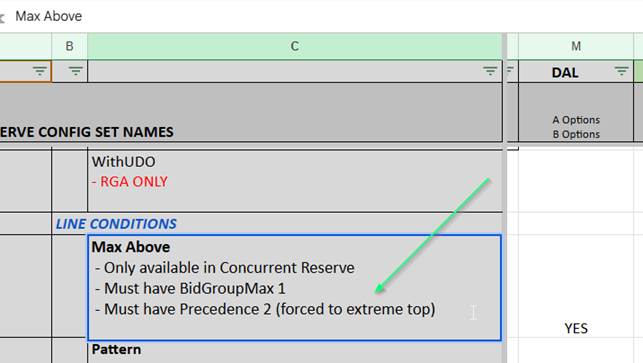
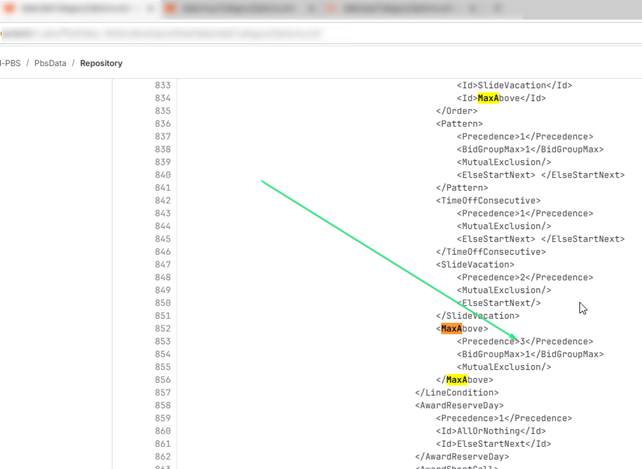
We confirmed and ensured that high-precedence Set Condition lines, such as "Max Above" (Precedence 2), correctly maintain their top position in a Reserve Bid Group, even when a new Prefer Off line is inserted above them. Guarantees that your critical, high-priority conditions are not accidentally displaced by other bid lines.
Resolution Details
The system now correctly evaluates the precedence of all existing lines before determining the insertion point for a new line.
D-48670 Community - Reserve Bid Group - Set Condition "Max Above" with Precedence 2 (Forced to Extreme Top) is Not Added on To When Prefer Off is First Line
Description
The Set Condition "Max Above" with precedence 2 (forced to extreme top) is not added on top when Prefer Off is first line. It can be moved to the top and then arrows are blocked and it can not move down and Prefer Off can not be moved back over this Set Condition.
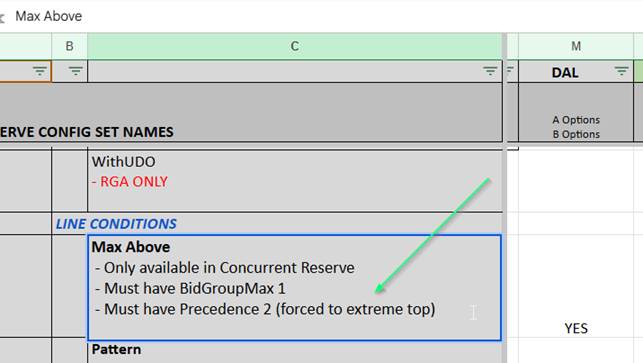
Please remember that Set Conditions for different ALC may have different precedence and behaviour. If any doubts - check the logic in the code with dev.
In case of DAL, the precedence value was updated to 3.
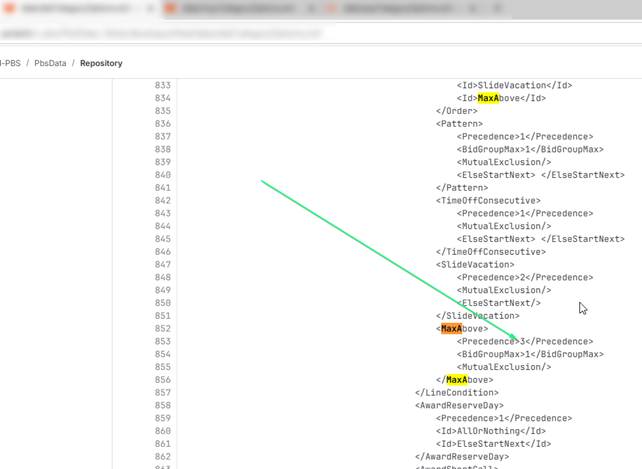
Resolution Details
Refined the logic for placing newly inserted or pasted bid lines. The system now prioritizes a line's set precedence (e.g., for Set Conditions) over other criteria, ensuring it is placed at the highest appropriate position and not incorrectly below lower-precedence lines.
D-48672Community - Reserve Bid Group - Set Condition without Set Precedence is Going on the Bottom of the Reserve Bid Group
Description
Set Condition without set precedence is going on the bottom of the Reserve Bid Group with Award Reserve lines (that also does not have set precedence - to be confirmed!)
Based on configuration file Consecutive Days Off In a Row does not have set precedence:
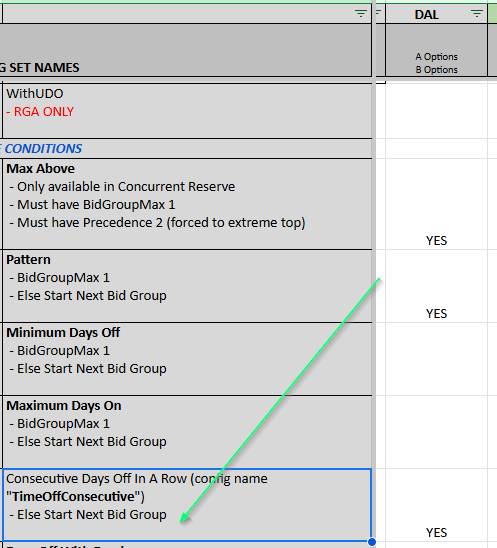
Resolution Details
Consistent Placement Logic: Ensured that when multiple bid lines share the same precedence, the location for a new line is accurately determined by the user's action (Insert Above/Below) and the line currently selected.
D-48661 Community - Reserve Bid Group Lines Ordering Issues
Description
Improved Reserve Bid Group Ordering: We have reimplemented and fixed the ordering logic for lines within Reserve Bid Groups to ensure predictable and correct placement. This addresses several key issues:
- Insertion Consistency: You can now successfully insert Prefer Off or Award Reserve lines above a Set Condition placed as the first line in the group.
- Correct Paste Location: Set Condition lines (without set precedence) now paste correctly after the last line in the group, rather than incorrectly positioning themselves under an existing Prefer Off line.
Resolution Details
Ensured that bid line insertion respects user intent, allowing "Insert Above" for same-precedence lines. We also corrected the default behavior so that new lines without set precedence are consistently added to the end of the group.
D-48305 Community - Running Out of DB Connections on Shared Servers
Description
Database Connection Efficiency: We have optimized the application's internal database connection pooling mechanism. The maximum pool size, which was previously capped at 1000 connections per application instance per ALC, has been reduced and made configurable. This change eliminates the high volume of unused, sleeping database connections, leading to better server resource management and improved system stability.
Resolution Details
Building on our recent connection pooling optimizations, we have introduced a new configuration parameter to give system administrators fine-grained control over resource allocation:
- New Parameter MAX_DB_CONN: A new configuration parameter has been added to the system's NAVNWSParams.xml file.
- Controlling Connection Pool Size: This parameter allows administrators to set the maximum size of the database connection pool, ensuring resources are optimally managed.
- Flexible Configuration: This limit can be configured either globally across the system or tailored per crew base (ALC) to meet specific operational needs.
- Note: The default value remains 1000 if this parameter is not explicitly set.
This change provides system administrators with the necessary tool to tune the application environment for maximum stability and resource efficiency.
D-47528 Community - The "Automate On Startup" Checkbox Has Been Checked Once Cannot Be Unchecked and Saved
Description
Fixed "Automate On Startup" Saving Issue: Resolved a bug affecting the ACA and DAL crew bases where the "Automate On Startup" checkbox could not be permanently unchecked. The system now correctly saves the unchecked status when you modify this setting.
Benefit: You can now reliably enable or disable the automated startup behavior as needed.
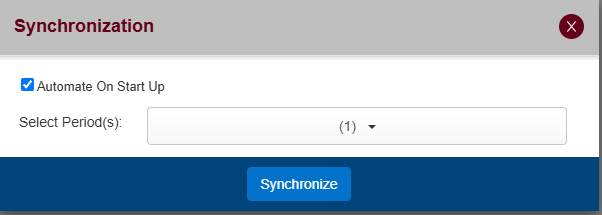
Resolution Details
Updated the application so that user preferences are now sent to the server and saved right away, eliminating the previous requirement to click "Logout" to save certain changes.
D-48878 Community - The Edited Bid Line Does Not Retain Its Precedence - From Award to Set Condition With Set Precedence or Short Call
Description
Corrected Precedence After Editing: Fixed an issue in the Pairing Bid Group where editing an Award Bid Line and changing it to a line with higher precedence (like a Set Condition Bid Line) would cause the line to remain in its old position. Edited lines now immediately move to the correct location based on their new, updated precedence.
Short Call Handling Fix (DAL): Also resolved an issue for DAL where Short Call lines, when created or updated by editing an Award Bid Line, were not correctly moved to the bottom of the bid group.
Resolution Details
Fixed a bug where editing a bid line to change its type or precedence did not automatically update its position. The line now correctly validates its new required position and moves accordingly.
D-48669 Community - When 'Set Condition Consecutive Days Off in a Row' Is Added With Undefined
Description
When the 'Set Condition' with 'Consecutive Days Off in a Row' is added without selecting 'Date Range', the bidline is displayed with undefined.
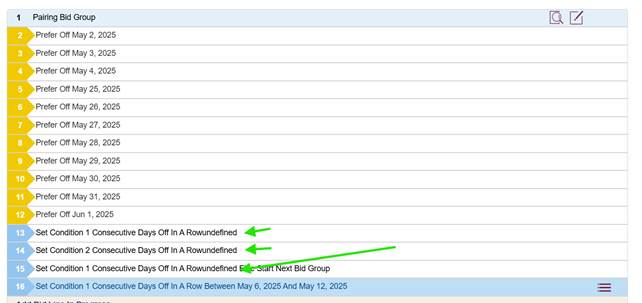
Resolution Details
Resolved a display bug where certain bid lines would show the text "undefined" instead of a blank space or the correct condition.
D-48025 Community - Bid Analyzer Filtering Out Things Due to Specific Lines That Do Not Match the Criteria
Description
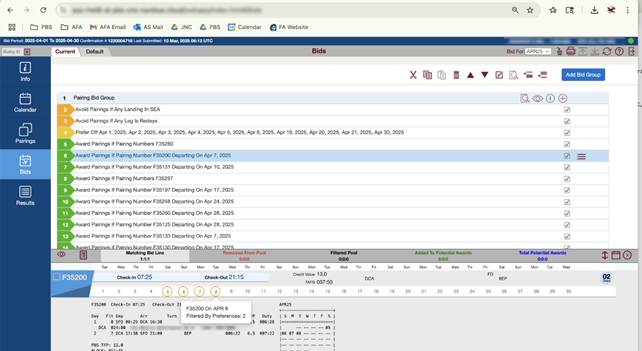
Bid Analyzer filtering incorrectly.
This correctly shows the matched pairings but shows them as filtered out because of line 2 of landing in SEA, but the pairing clearly shows it does not land in SEA.
Resolution Details
Fixed an issue where using filters with exact matches (like "Exactly =") or filters without comparison options (like Redeyes or Landings In) could produce incorrect results. Filters now compare values reliably and accurately without misinterpreting the data.
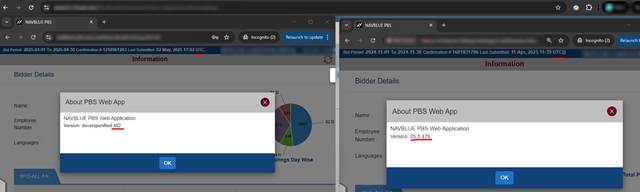
D-48733 Community - 25.3.2 / 25.5 Empty Brackets Are Displayed After UTC on the Webapp
Description
Version is not showing upon pop up
Resolution Details
Resolved a bug that caused issues when retrieving bid set data if the bid was system-generated and lacked an entry in the "Submitted By" field.
D-48255 Community - Bid Replacement Message Doesn't Show After Canceling for the First Time and Resync
Description
Resolved an issue where clicking "Cancel" on the "Replace Bid" pop-up during a synchronization attempt (after updating and submitting a bid) would incorrectly prevent the pop-up from reappearing on subsequent sync attempts. Benefit: You will now be correctly prompted to confirm or cancel the bid replacement every time you initiate a sync.
Resolution Details
Ensured that the logic for "Cancel" in the bid replacement prompt is correctly implemented, providing users with the intended control over the synchronization process.
D-48074 Community - '500 Internal Server Error' Appears and It Causes PBS Application Not Workable When the User Selects the Importing File With Inappropriate Format
Description
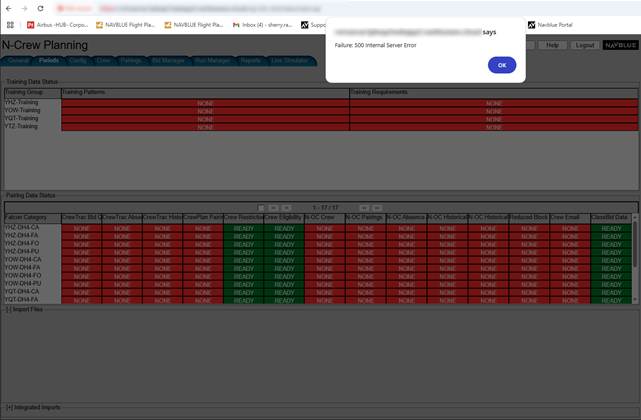
When the user selects an inappropriate format of importing file- The '500 Internal Server error' keeps displaying and it causes the PBS application not to work, unless the server restarts.
Resolution Details
Implemented stronger internal safeguards to prevent application crashes caused by accessing invalid memory locations (array out-of-bounds errors).
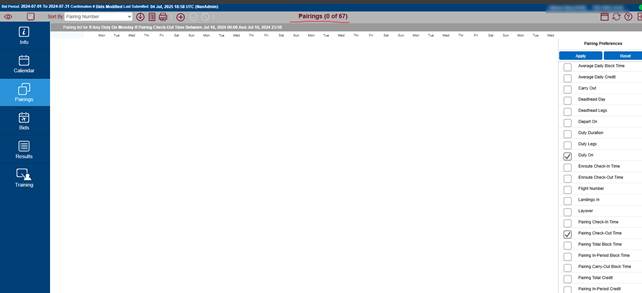
D-48237 Community- Bid Analyzer Table Does Not Display Returned Pairings, also Previous Filtered Pairings are Empty in Pairings Tab-When Toggling Between Bids Tab and Pairings Tab
Description
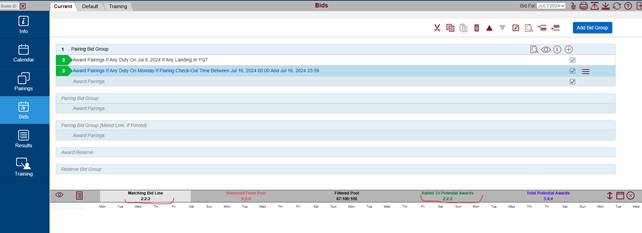
When toggling between Bids tab and Pairings tab-Bid analyzer table does not display returned pairings, also previous filtered pairings are empty in Pairings tab. For example:
Resolution Details
We've delivered two key fixes to ensure filters and analysis tools work exactly as expected, providing you with more precise results in Pairings, Training, and Bids.
Date Range Filter Accuracy Fixed: Resolved an issue in the Pairings, Training, and Short Call tabs where the time component of the date range filter was lost when switching between tabs. Previously, a range like "01/01/2025 0:00 to 01/01/2025 23:59" would incorrectly shrink to "01/01/2025 0:00 to 01/01/2025 0:00," causing most pairings to be incorrectly filtered out. The full time range is now correctly retained and applied.
Analyzer Filter Isolation: The Analyzer tool in the Bids tab no longer incorrectly uses the same date range filter logic as the Pairings tab, ensuring its internal analysis functions independently and accurately.
D-48857 Community- Webapp and AdminUI Hangs When Specific Steps Are Performed
Description
Web app and AdminUI hangs while specific steps are performed.
We jump from AdminUI to Webapp and we have two tabs opened / or we log directly to Webapp
Then when we go to Bids and create the empty Bid group and delete it.
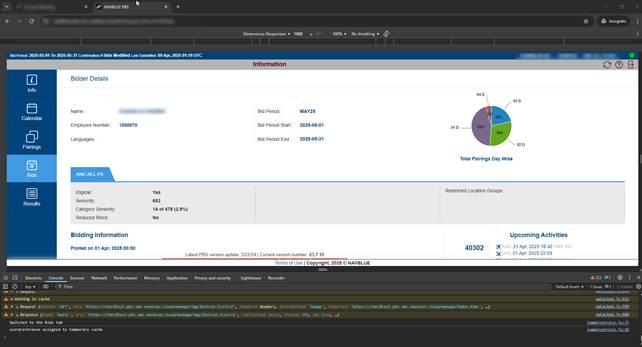
Then we jump to the Info page and we want to come back to the Bids page where the whole browser hangs. We still see the Info page.
We are not able to click anything nor on Webapp neither on Admin UI (in case we jump from Admin UI)
Devtools Console does not show any error:
after some time AdminUI tab is blank:
Resolution Details
Resolved a critical stability issue where returning to the Bids page, especially after deleting a bid group, could cause the application to enter an infinite loop of searching for a non-existent selected group, resulting in an unresponsive screen. The application now correctly unsets the selection and prevents this loop from occurring.
D-46590 Community- AdminUI - LogoutUrl in Localstorage Is Not Clean Up During Disconnecting from SSO
Description
Ensured that session data (LogoutUrl) is correctly cleared after an SSO session in the AdminUI, preventing incorrect display issues during subsequent logouts in normal mode.
Resolution Details
We fixed an issue that could cause a sensitive internal token to be displayed on the screen during logout in the AdminUI, particularly when switching between SSO (Single Sign-On) and standard login modes. The server no longer uses the affected parameter for error messaging, ensuring a clean and secure logout experience.
D-48250 Community- Not Correctly Displaying Pairing That Checks In on One Date but Departs on Another (Analyzer & Bids Tab)
Description
In Pairings Tab:
Select Depart on April 7
Select check in after 2300 on April 7
Apply
This should Not Produce a result.
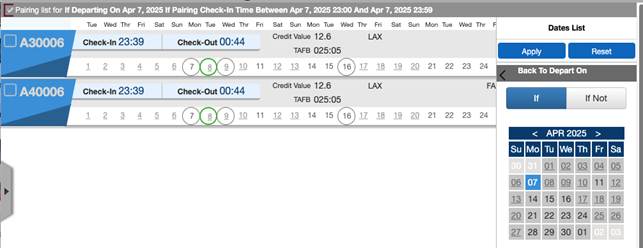
In Pairings Tab:
Select Depart on April 8
Select check in after 2300 on April 7
Apply
This should produce a result.
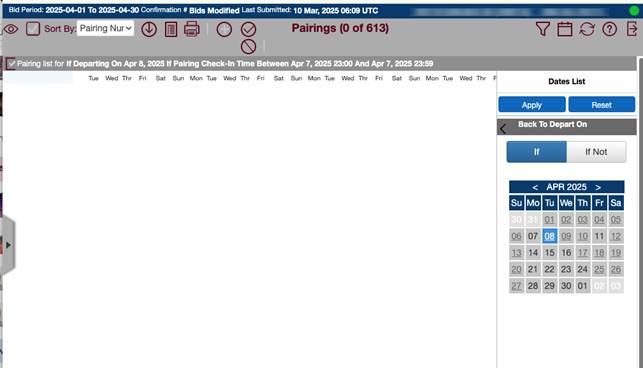
Resolution Details
Fixed a subtle calculation error that could sometimes cause the effective date of a pairing (or other time-sensitive data) to be calculated incorrectly twice. This ensures that pairings whose check-in and departure times span midnight are now assigned the correct effective date and are not accidentally shifted by an extra day.
D-47475 Community - Pairing Filter add Bids Mode - Duty On> Time>Select Range - Award Button Does Not Work
Description
Duty On > Time > Range - cannot click "award" to bid
When trying to add "all" of the pairings within the chosen preference or even adding a selected few, neither option will allow you to click on the "award" to add it to your bid
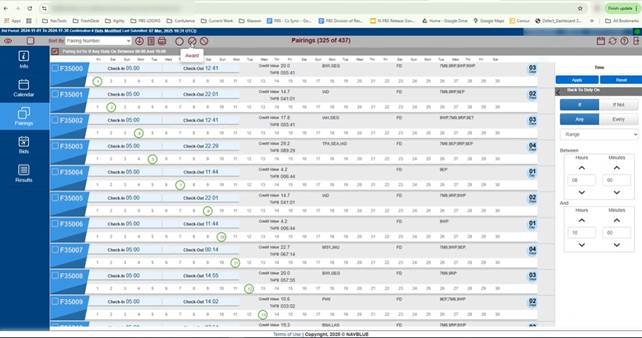
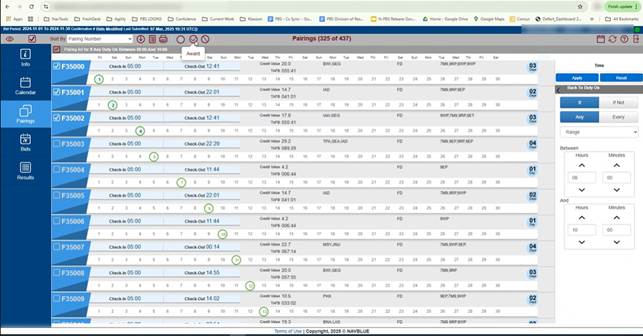
Resolution Details
The award button didn't work due to critical error in code execution. The problem was resolved and the award button is now available.
D-48219 Community -
Bid Analyzer Not Adding Pairings to Potential Awards and Total Potential Awards
Description
This correctly shows the matching pairings but none show as added to potential awards despite the fact that this is the first line it is requested.
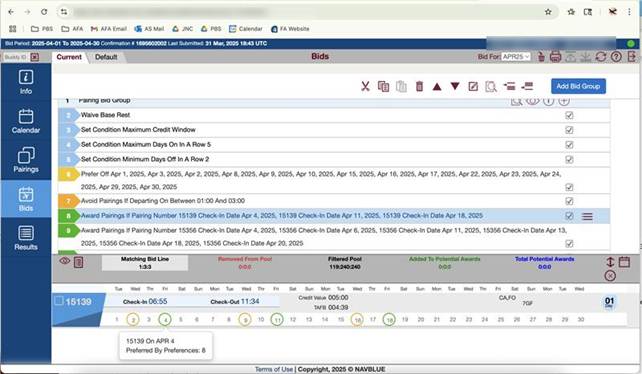
Resolution Details
Fixed a bug where pairings were sometimes incorrectly excluded from the calculation of added/total potential awards. Pairings are now correctly counted and added to your potential awards totals.
D-47852 Community -
Bid Analyzer Fails After Re-Sync and Submit When Pairing Name Contains a Letter
Description
Problem with Analyzer AFTER bid is submitted, Crew resyncs and then reanalyzes.
This ONLY seems to happen with pairing numbers that start with a LETTER - and ONLY when you have ONE selected - this seems to work with 2 more more.
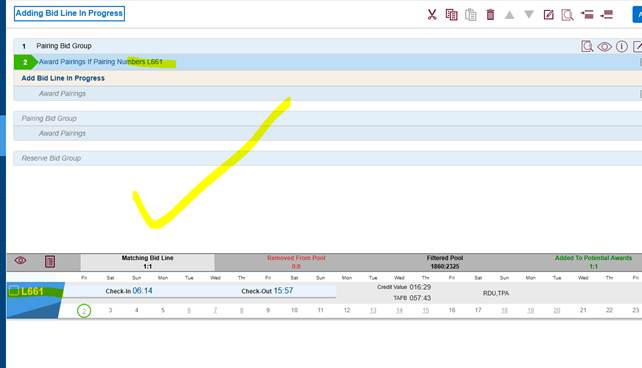
AFTER SUBMIT AND SYNC AND RE ANALYZE:
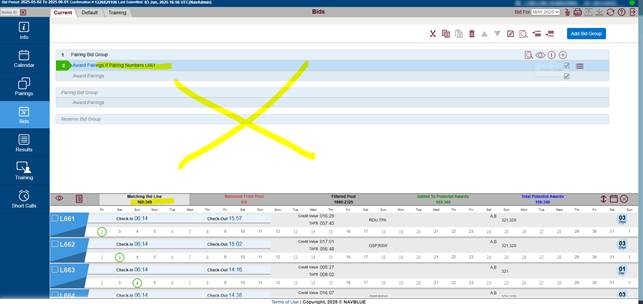
Resolution Details
Corrected an issue to ensure that filter comparisons in Pairings, Training, and the Analyzer operate reliably and return the correct data, especially when using exact matching or simple status filters.
D-48125 Community- Adding Prefer Off - Ordering Issue
Description
When adding Prefer off to a bid group, they are not inserted in the correct order; rather, they are always added to the top of the group.
The Prefer Off preference on line 3 was added using the insert below option from Avoid pairing bid preference ( Currently Line 8, was Line 7 before the prefer off was applied.)
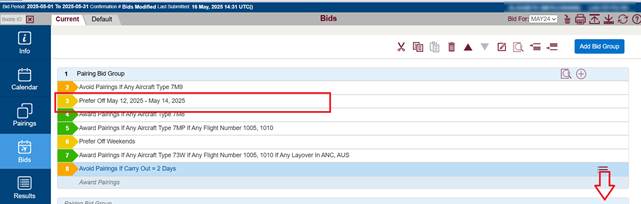
Resolution Details
We implemented a new and more accurate indexing system for bid lines. This fix specifically ensures that the "Prefer Off" line is always inserted in the correct, appropriate order within your bid group, resolving previous placement issues.
D-47906 Community - Editing "Prefer Off and AVOID" JUMPS the Added Order of Award
Description
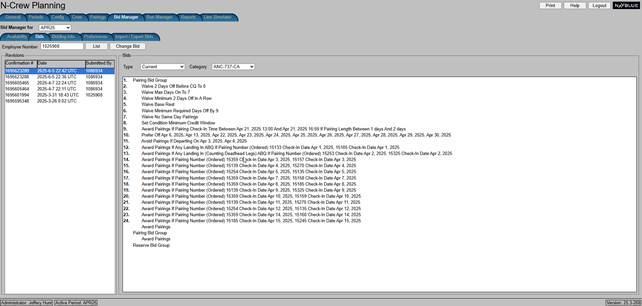
When editing an existing negative bid, such as prefer off or avoid that falls below an award statement, the avoid and prefer off JUMPS above the award statement.
Edited the bid - added an avoid Line into line 12 and edited line 9 to a range between 1 and 2 days and submitted
The prefer off line JUMPED above the edited award statement
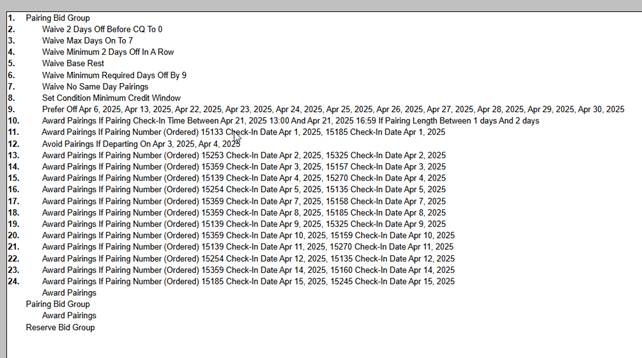
I went back and then edited line 11 and added ABQ as a landing requirement.
the Avoid on line 12 then jumped above line 11.
Resolution Details
Resolved issues caused by outdated indexing logic. Bid lines no longer move unexpectedly after being edited, and the "Prefer Off" line now retains its correct placement after being pasted.
D-49113 Community- Trip Details on Calendar View, With Mobile Devices (From 25.5 Testing)
Description
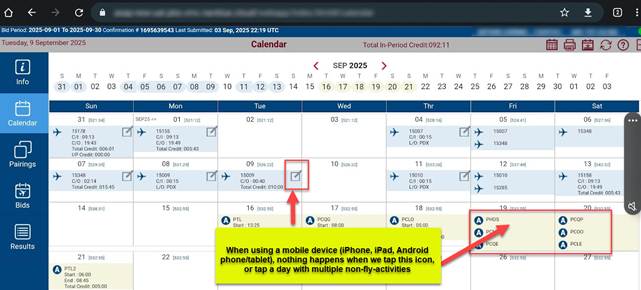
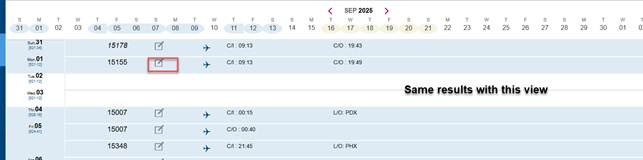
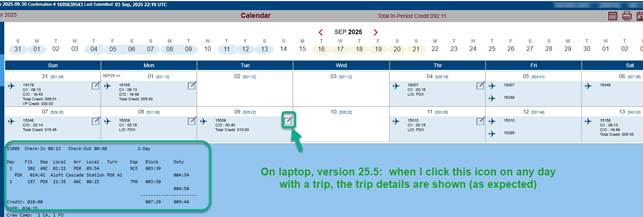
Resolved an issue on the Crew Portal Calendar tab (version 25.5) where users on touchscreen devices (phones and tablets) could not view detailed information for pairings or days with multiple non-flying activities. Tapping the details icon now correctly displays the expected trip and activity details, restoring functionality to all mobile users.
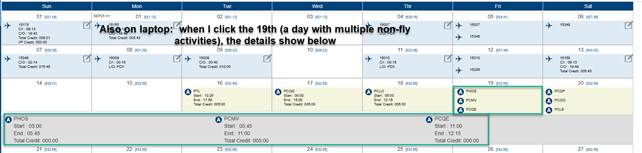
Resolution Details
Corrected an internal setting within the calendar's container logic to ensure touch events are properly recognized by calendar entries on mobile devices.
D-48577 Community- Community Compilation Fails with Recent Version of NAVBLUE-Core-Devel Package
Description
Remove a duplicated and unnecessary macro definition (NAVALEN) from the application code. This addresses a conflict that caused compilation errors with the latest version of our underlying core development libraries.
Resolution Details
We performed an internal maintenance update by removing an obsolete file (NavMacro.h). This cleanup resolves a compilation error with the latest core development packages, ensuring smoother, more stable application builds and deployments in the future.
D-48181 Community - Delete Prepared Period -> Run Manager Tab - Error: Unable to Find the Period
Description
After deleting the prepared period and going to the Run Manager tab an error is generated. This happens when going to any other tab and then proceeding to the Run Manager tab.
The issue can be alleviated by logging out and back in.
Resolution Details
Fixed an issue where if no period was explicitly selected (i.e., the selection was null), the system would fail to default to the currently active period. The application now intelligently detects a null selection and automatically selects the active period, ensuring a stable interface.
D-48191 Community - No Possibility of Adding a Bid Line for Layover from the Pairing Tab
Description
There is no possibility to add a bid line from the created filter for Layover in the Pairing tab. Instead of adding a bid line, the N-PBS shows a pop-up message:
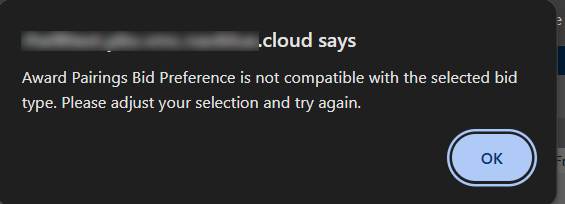
But if we create an Award bid line with the same conditions directly in the Pairing bid group, then no error is displayed, and a bid line can be submitted.
Resolution Details
Corrected an issue where start and end date objects were improperly initialized, thus preventing a cascade of errors in date-dependent functionality.
D-48686 Community- Incorrect Circle Coloring for Event Filters in Training Screen
Description
The training screen displays incorrect circle colors when using day or date based event start or event touches filters. This occurs in V25.1
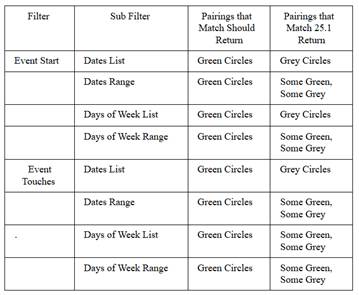
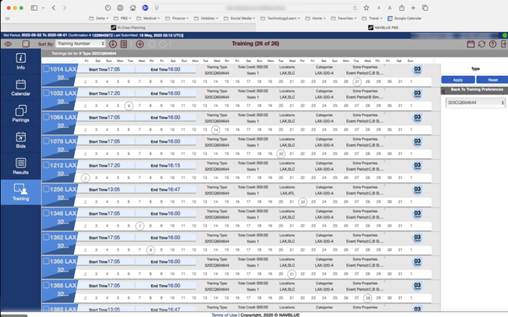
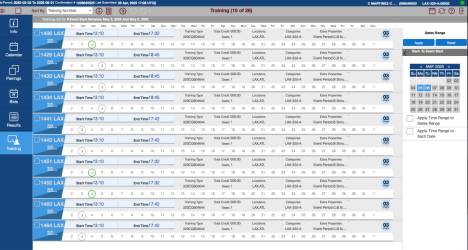
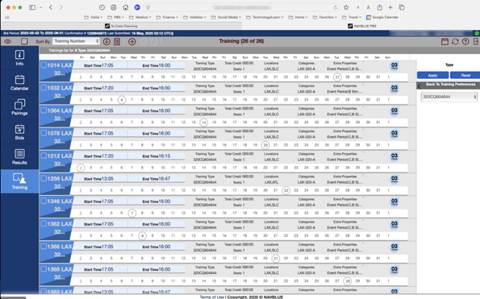
Resolution Details
Resolved an issue where a previously matched training assignment could be incorrectly removed if a secondary date check failed. Matches now persist if any valid condition is met.
D-48023 Community – Error When Upgrading NavLog Package
Description
When upgrading release test machine:
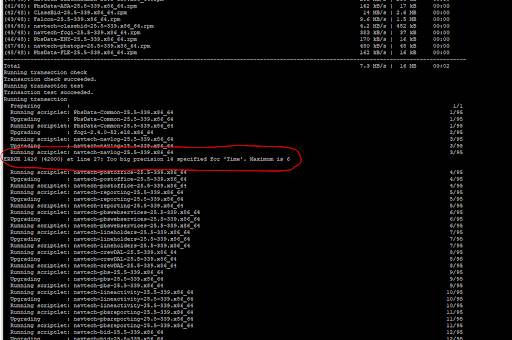
Resolution Details
Change the millisecond to 6 instead of 14
D-48612 Community - Infinity Loading When Analyzer Window in Training is Open and the Tab Changes
Description
When attempting to change the tab while the analyser window for training is open from "Training" to "Current" tab, the application completely freezes. Currently only discovered on ACA rhel8 version developunified-461.
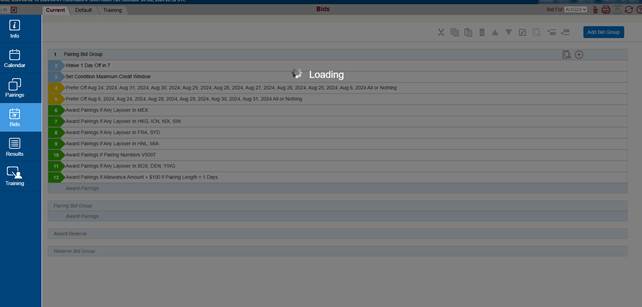
Resolution Details
Ensured the "Loading" state immediately ends on the Training Analyzer once bid lines are loaded and filtered, preventing the modal from hanging when changing tabs.
D-46850 Community- PbsDbUtil.pl - Missing Logic
Description
Database Utility Improvements:
- The PbsDbUpgrade.sh script now automatically creates necessary, missing CSV files during execution to prevent upgrade errors.
- The PbsDbUtil.pl script has been updated to allow full toggling of the Bidding Import functionality, enabling administrators to both activate and deactivate the Test/UAT mode on a PBS database as needed.
Resolution Details
Implemented the ability to safely toggle ON or OFF the Bidding Import functionality on a database. This provides administrators with necessary control to revert a system's status from a "Test" configuration to a "Production" configuration.
D-47674 Community- SSO - Logout from Admin UI after Logging out of WebApp Generates Error
Description
1) Login to Admin UI
2) Go to Bid Manager -> Bids -> (enter Employee Number) -> Change Bid
3) Logout of WebApp
4) Logout of Admin UI

Resolution Details
Ensured that the correct logout URL is retained after session termination in the Bidder UI for predictable post-logout navigation.
D-49643 Community - Auto-Save is Not Working Properly When a New Bid Line from the Training Tab is Added to the Training Bid Group
Description
Auto-Save is not working properly when a new bid line from the Training tab is added to the Training Bid Group. Generally, when we have saved bids and nothing is in the browser cache.
Resolution Details
Fixed an issue where the application sometimes lost track of local bid modifications. The logic for marking bids as modified is now triggered immediately upon saving, guaranteeing that your latest local changes are protected from being overwritten by the server during sync.
D-49505 Community -
Selected Import Group Value Disappears When Period is Selected in the Archived Imports
Description
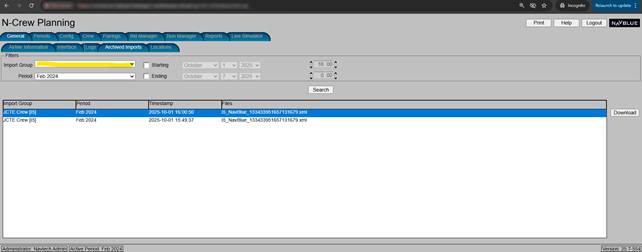
Resolution Details
Resolved an issue where the selected Import Group was lost or reset after the options list was refreshed (e.g., when the data was reloaded). The application now reliably captures the selected group's unique ID and restores the correct selection from the newly loaded list. Your selection remains stable and persistent, even when the underlying data is updated.
D-49492 Community- The Menu Options are Disabled, and Analyze Button is Not Working After Adding New Bid Line
Description
Menu options and the Analyze button for the Training Bid Group to become unresponsive immediately after adding a new bid line from the Training tab.
Resolution Details
To ensure that newly added bid lines from the Training and Pairing pages are immediately visible and correctly displayed on the Bids page, we improved the way the system updates the list of bids.
Now, after a new line is added:
- The list of bids is automatically refreshed.
- The newly added line is properly selected and shown with all relevant options and actions available (such as editing or inserting lines).
This change ensures a smoother and more intuitive experience for users working with bids, without needing to manually refresh or reselect anything.