
D-50116-Training - Waive Training line can be added below Award Training bid line
Description
The Waive Training line can be added below Award Training bid line

Resolution Details
The bid ordering logic has been refactored to be more generic and inclusive.
The Fix: The precedence enforcement condition has been moved to a broader scope within the code.
The Result: This check now applies to all bid line types, including training lines. Training bids will now automatically adhere to the established precedence rules, ensuring they are placed correctly within the bid interface.
D-50696-Community-Traditional Calendar view shows only February month (missing bid-period carry-in/carry-out days)
Description
An inconsistency was identified in how the Traditional Calendar renders the active bid period compared to the Vertical Calendar. While the Vertical view correctly displays the full bid period, the Traditional view was found to be restricted to the "standard" calendar month.
Symptoms
During the February 2026 bid cycle, users noted the following:
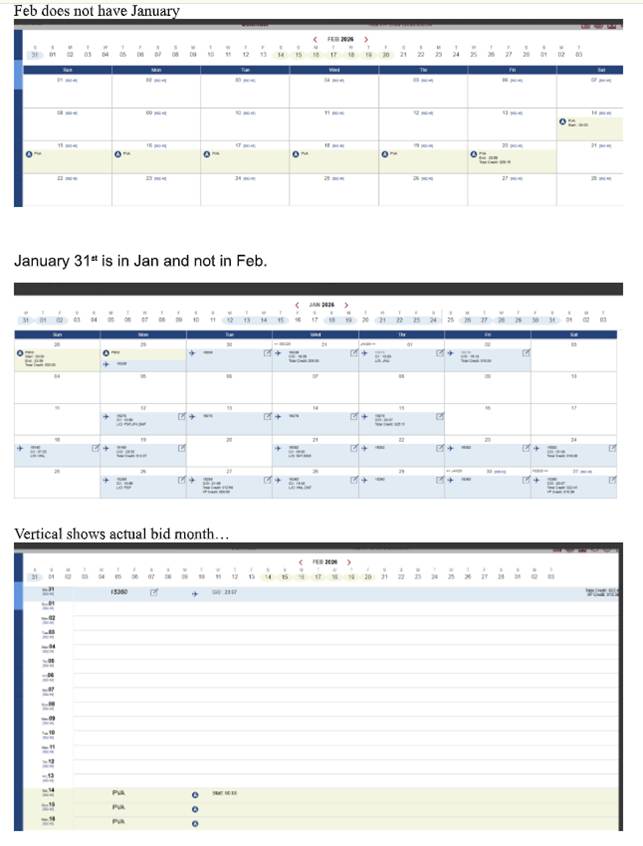
Missing Carry-In/Carry-Out: The Traditional Calendar only displayed February 1st through February 28th. It failed to show the carry-in days from late January and carry-out days into early March that are part of the actual bid period.
Navigation Hurdles: Specifically, January 31st (a valid day for the February bid) was hidden. Users were forced to manually navigate back to the January calendar month to view or interact with that specific date.
UI Inconsistency: The Vertical Calendar correctly initialized with the full bid period range, highlighting a rendering error specific to the Traditional grid view.
Resolution Details
The rendering logic for the Traditional Calendar has been corrected.
The Fix: The calendar now uses the full bid period range as its primary bounds rather than the Gregorian calendar month.
The Result: All carry-in and carry-out days are now visible by default within the primary grid, ensuring a seamless view of the entire bid period without requiring extra navigation.
Impact
Affected Area: Crew Interface > Calendar (Traditional View).
Benefit: Provides a complete and accurate visual representation of the bidding window, ensuring crewmembers do not miss carry-in days at the start of the month.
D-51011-Community-Redo From Line and Forget Bid Line with not proper values after copy-paste
Description
Issue Summary
An issue was identified in the Bid Manager where copying and pasting specific bid combinations—specifically those containing "Redo From Line" or "Forget Line" instructions—resulted in incorrect line references in the destination group.
Symptoms
When a user copied a block of bids from one Pairing Bid Group and pasted them into a second group that already contained existing lines, the following occurred:
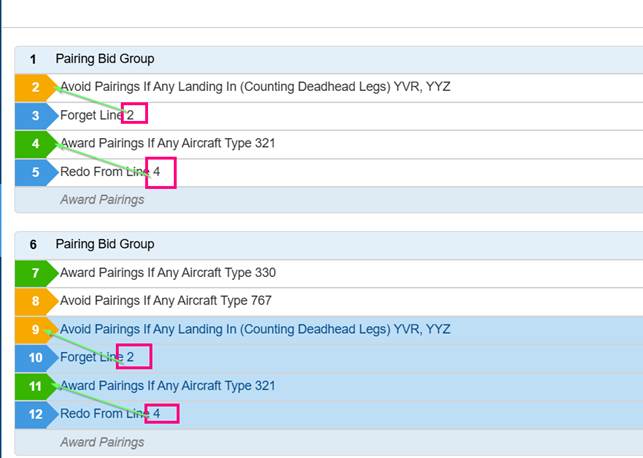
Static Line References: The "Forget Line" and "Redo From Line" indicators retained the line numbers from the original group rather than updating to match their new positions in the target group.
Incorrect Visual Indicators: As seen in the provided examples, a "Forget Line" pasted into Line 10 might still point to "Line 2," even though the intended target line was pasted into Line 9.
Processing Errors: This caused the award engine to reference the wrong logic or skip lines entirely during the bid run because the relational pointers were broken.
Resolution Details
The copy-paste logic within the Bid Manager has been updated to be "positionally aware."
The Fix: The system now identifies relational bids (like Redo and Forget) during the paste action and automatically re-calculates the correct target line numbers based on their new sequence in the bid string.
The Result: Pasted lines now point to the correct relative bid within the new group, maintaining the integrity of the user's bidding strategy.
Impact
Affected Area: Bid Manager (User Interface).
Benefit: Crewmembers can safely copy and paste complex bid structures across groups without having to manually edit line numbers. This reduces the risk of logic errors that could negatively impact award results.
D-50690-Community-PairingNumber Check-In Date (Ordered) setting is removed after reopening editor and clicking Apply
Description
Issue Summary
An issue was identified where the (Ordered) setting on a Pairing Number Check-In Date bid line would unintentionally reset. When a user opened an existing bid line with this property and clicked Apply, the "Ordered" attribute was stripped away, even if the user didn't change any settings.
Symptoms
Loss of State: After clicking "Apply," the bid line in the manager would lose the (Ordered) tag.
Manual Rework Required: To restore the intended logic, users were forced to reopen the preference editor, manually toggle the Ordered setting back to ON, and apply the change a second time.
Award Impact: If not caught by the user, the loss of the "Ordered" property could change how the award engine prioritized specific pairings, potentially leading to undesired award results.
Resolution Details
With these changes, the "Ordered" attribute is now correctly read from and written to the bid data object. The setting will persist through multiple edit-and-apply cycles without requiring the user to manually re-toggle the option.