
S-100156 Community - Remove Ordered from Landings in Option
Description
We have updated the Landings In bid preference option to remove the unsupported "Ordered" selection. This change ensures that all displayed preference options are fully functional and supported by the PBS system, providing you with a more accurate bidding experience.
Acceptance Criteria
GIVEN any ALC bidder
WHEN in an award pairing, Landings In bid preference screen
THEN I should not be able to see the Ordered option and the counting deadhead legs checkbox should be unchecked by default
S-103673 Community - Enhance Raido Pairing Import Messaging
Description
We have enhanced the Raido pairing importer to provide more descriptive feedback when import conflicts occur. Previously, if two pairings shared the same bidding number but had different structural data (like different flight numbers or duty times), the system would issue a generic "duplicate" error.
What’s New: The importer now performs a deep comparison of conflicting pairings. If a mismatch is found, the error log will explicitly list the differing fields—such as Credit, TAFB, Duty Start/End times, and Flight Numbers—allowing you to quickly identify and resolve data discrepancies in your source file.
Example Log:
ERROR: The pairing IAH-H0090 is duplicated... H0090/Fri Oct 31 conflicts with H0090/Sat Nov 01 Credit: 882 != 869 EndLocation: SGF != MFE
Acceptance Criteria
GIVEN a Raido pairing file is being imported
WHEN a pairing with the same bidding number as another pairing cannot be merged together
THEN the importer will output reasons why the pairings cannot be merged together, in addition to the original duplicate pairing message.
S-100919 Community - Pairings Report for ALL Categories is Generated But Can Not Be Saved
Description
We’ve improved the stability and processing speed of the Pairings Report when selecting the "ALL" category. Previously, these comprehensive reports could occasionally time out during the saving process if the data volume was high. This update ensures that large reports for all airlines are processed and saved successfully without interruption.
When report generation is started:
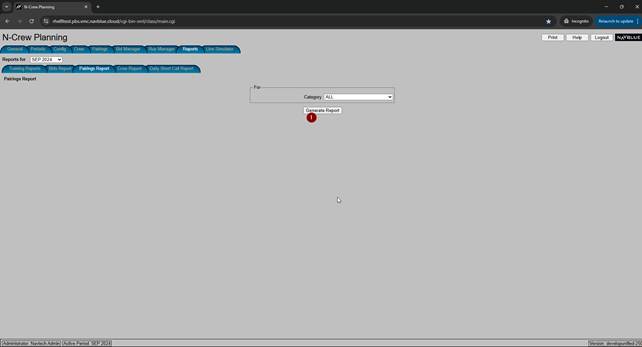
Report is generated but when Save button is used
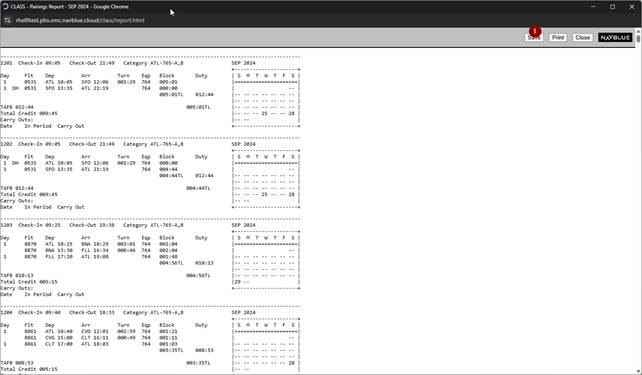
After about 60 seconds of processing it finishes with following error
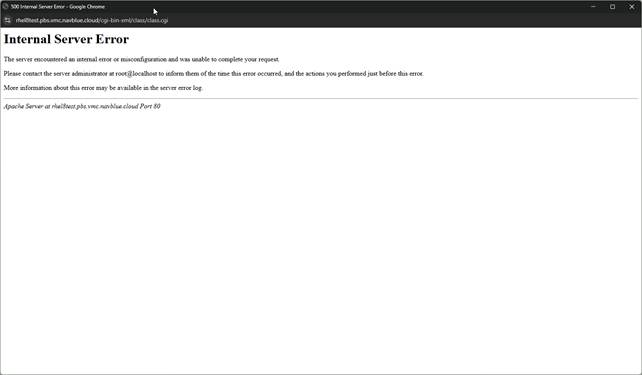
Acceptance Criteria
GIVEN a PBS admin
WHEN a pairings report is generated for all categories
THEN I'll be able to save the report without issues.
GIVEN a PBS admin
WHEN the combined report is generated for a completed run
THEN I'll be able to save the report without issues.
S-103383 Community - The Check Box to Enable the "Show Pairings Report"
Behaviour Change
Description
UI Update: Improved Report Generation Workflow To create a more intuitive experience, we have removed the requirement to select all pairings or trainings before generating a report.
Removed Error Messaging: Users will no longer encounter a "Selection Required" error when attempting to view reports with an empty checkbox state.
Full Tab Support: This logic has been applied across the Pairings, Training, and Results tabs.
Filter Compatibility: The report will automatically respect any active filters you have set, ensuring you get the data you need with fewer clicks.
Acceptance Criteria
Pairings tab
GIVEN any ALC Bidder
WHEN the Select All Pairing checkbox is unchecked
AND the Show Pairing Report icon is clicked
THEN the pairing report will be displayed for all available pairings
AND no error message, No pairing(s) selected is displayed
GIVEN any ALC Bidder
WHEN the Select All Pairing checkbox is checked
AND the Show Pairing Report icon is clicked
THEN the pairing report will be displayed for all available pairings
GIVEN any ALC Bidder
WHEN any paring filter is set and the results are displayed
AND the Select All Pairing checkbox is unchecked
AND the Show Pairing Report icon is clicked
THEN the pairing report will be displayed only with records from the search result
AND no error message, No pairing(s) selected is displayed
GIVEN any ALC Bidder
WHEN any paring filter is set and the results are displayed
AND the Select All Pairing checkbox is checked
AND the Show Pairing Report icon is clicked
THEN the pairing report will be displayed only with records from the search result
Training tab
GIVEN any ALC Bidder
WHEN the Select All Training Patterns checkbox is unchecked
AND the Show Training Report icon is clicked
THEN the training report will be displayed for all available pairings
AND no error message, No training(s) selected is displayed
GIVEN any ALC Bidder
WHEN the Select All Training Patterns checkbox is checked
AND the Show Training Report icon is clicked
THEN the training report will be displayed for all available pairings
GIVEN any ALC Bidder
WHEN any training filter is set and the results are displayed
WHEN the Select All Training Patterns checkbox is unchecked
AND the Show Training Report icon is clicked
THEN the pairing report will be displayed only with records from the search result
AND no error message, No training(s) selected is displayed
GIVEN any ALC Bidder
WHEN any training filter is set and the results are displayed
WHEN the Select All Training Patterns checkbox is checked
AND the Show Training Report icon is clicked
THEN the pairing report will be displayed only with records from the search result
AND no error message, No training(s) selected is displayed
Results tab
GIVEN any ALC Bidder
WHEN the Show Results Report icon is clicked
AND no awards records are marked
THEN the results report will be displayed for all available awards
AND no error message, No Award(s) selected is displayed
GIVEN any ALC Bidder
WHEN the Show Results Report icon is clicked
AND some of the award pairing records are marked
THEN the results report will be displayed only with selected records
S-103869 Community - Reserve Line Simulator - Enhancement
Description
Advanced Reserve Day Constraints in Simulator
The Challenge: Previously, PBS Admins had limited flexibility when simulating reserve line builds, making it difficult to test specific "Must Be" or "Must Not Be" day requirements.
The Solution: We’ve introduced a new Must Be/Must Not Be Reserve Day section within the Reserve
Line Simulator. Admins can now manually designate specific days in a bid period as required reserve days or restricted days.
The Benefit: This allows for more granular testing of reserve modules and provides detailed data in the Reserve Report, ensuring your line-building logic is accurate before going live.
Acceptance Criteria
GIVEN a PBS admin
WHEN viewing the reserve line simulator
THEN I should be able to see new "MUST BE / MUST NOT BE Reserve Day" Section
GIVEN a PBS admin
WHEN viewing the new "MUST BE / MUST NOT BE Reserve Day" Section
THEN I should be able to see the option to check either MUST BE Reserve Day OR MUST NOT BE Reserve Day for each day in the bid period
GIVEN a PBS admin
WHEN using the Test reserve functionality
THEN the system should use the "MUST BE / MUST NOT BE Reserve Day" Section data when determining the feasibility of building the reserve line and I should be able to see the appropriate data in the report.
S-101534 Community - Reserve Line Simulator Phase 1
Description
We are excited to introduce the Reserve Line Simulator, a powerful diagnostic tool for PBS Administrators. This feature allows admins to proactively test and troubleshoot reserve line construction for specific crewmembers or test profiles.
Key Capabilities
Targeted Troubleshooting: Administrators can now load a crewmember's specific pre-awards and absences into the simulator to determine if a legal reserve line can be built.
"What-If" Testing: Admins can manually add, remove, or modify pairings and absences within the simulator to see how changes affect legality—without impacting the crewmember's actual live data.
Comprehensive Legality Reporting: By clicking "Test Reserve," the system generates a detailed popup report. If a legal line cannot be built, the report identifies exactly which rule (or combination of rules) is causing the conflict.
Rule Parameter Tuning: Admins can now adjust per-run modifiable reserve rule parameters directly within the simulator to test how different configurations impact line-building results.
UI Improvements & Navigation
To accommodate this new functionality, we have updated the Line Simulator interface:
Parent Tab Structure: The existing "Line Simulator" tab is now a parent tab.
New Sub-Tabs: Users will now navigate between two specific views:
Pairing Line Simulator: Functions exactly as the previous simulator did.
Reserve Line Simulator: The new workspace for reserve-specific testing.
Contextual Visibility: The "Reserve Line Simulator" sub-tab will automatically appear for all customers utilizing the Concurrent, Consecutive, or Consecutive Mixed reserve modules.
Detailed Diagnostic Intelligence
The new Reserve Line Simulator Report provides deep insights into the line-building process by categorizing rules to show exactly where a block occurs:
Fundamental Rules: Confirms the required number of reserve days based on proration and pre-awards.
Compulsory Pattern Rules: Evaluates minimum/maximum days on and minimum days off.
Built-in Rule Relaxation: The simulator mirrors the live production engine by accounting for rules that allow "built-in relaxation." The report will specify if a rule was relaxed to achieve a legal line, providing full transparency into the result.
Note: This Phase 1 release focuses on "Main-Run" reserve types (e.g., AM/PM, RES). Post-process allocations, such as daily short call shifts, are currently outside the scope of the simulator.
Admin Benefits
Reduced Support Time: Quickly identify why a crewmember did not receive a legal reserve line during a run.
Policy Validation: Test new reserve rule parameters in a safe environment before launching a live bid period.
Data Accuracy: The simulator uses the same logic as the main PBS engine, ensuring that "Pass" or "Fail" results in the simulator accurately reflect production behavior.
Acceptance Criteria
GIVEN A customer who has the reserve module (either Concurrent, Consecutive, or Consecutive Mixed Lines)
WHEN viewing the admin UI
THEN I will see the "line simulator" parent tab, with 2 sub-tabs for "pairing line simulator" and "reserve line simulator"
GIVEN A customer who does not have the reserve module (none of Concurrent, Consecutive, or Consecutive Mixed Lines)
WHEN viewing the admin UI
THEN I will see the "line simulator" parent tab, with 1 sub-tab for "pairing line simulator"
GIVEN any customer
WHEN using the pairing line simulator
THEN it will continue to work in the same way as the previously-existing line simulator
GIVEN a customer with the reserve module
WHEN using the reserve line simulator
THEN I will be able to do the following things in exactly the same way as the existing pairing line simulator:
select a category
enter an employee number and click "copy Line" in order to load the pre-awards of that person into the reserve line simulator (with an error if the employee number is not found in the selected category), or simply use the simulator without doing "copy Line"
add/remove/modify pre-awarded pairings and absences (in the same way as the pairing line simulator). (This will add/remove/modify those pre-awards within the context of the reserve line simulator, without affecting the actual pre-awards held for this person (visible in the crewmember details - activities tab), and without affecting any pre-awards currently held in the pairing line simulator tab).
ability to click "Clear" to clear all the currently-loaded pre-awards.
ability to click "View" to see details of a currently-loaded pairing
GIVEN a customer with the reserve module, who has some run-modifiable reserve rule parameters (available as run parameters)
WHEN using the reserve line simulator
THEN I will see those same run-modifiable reserve rule parameters and be able to edit them and have the edited values taken into account by the reserve line simulator (it is not possible to test every scenario here, but sufficient to show that for a particular customer with those parameters, the same parameters show in the reserve line simulator as in the run parameter screen, they can be modified, and they affect the reserve line simulator (e.g. changing parameters to something which makes it impossible to construct a legal reserve line will cause the reserve line simulator to report that fact!)
GIVEN a customer with the reserve module
WHEN using the reserve line simulator and clicking on the "Test Reserve" button
THEN a Reserve Line Simulator report will popup, which will be possible to view/save/print/close, similar to other reports)
GIVEN a reserve line simulator scenario for a customer with 1 main-run reserve type (e.g. "RES")
WHEN viewing the report
THEN the report will start with a heading like "For Reserve Type RES:"
GIVEN a reserve line simulator scenario for a customer with 2 main-run reserve types (e.g. "AM" and "PM" or for POE: RSA & RSB)
WHEN viewing the report
THEN the report will have 2 sections each starting with a heading like "For Reserve Type AM:" and "For Reserve Type PM:"
AND THEN Within each of those 1 or 2 sections, the report will state the exact number of reserve days that were required (by the fundamental rule). e.g. "ReserveTotalDaysOff rule: 17 RES days required", or "ReserveTotalDaysOnUsingCreditProration rule: 18 RES days required".
GIVEN a reserve line simulator scenario for a specific main-run reserve type
WHEN a legal reserve line can be built (with all the relevant rules and parameters)
THEN the report will say "With all rules: Possible to build a reserve line"
AND WHEN a legal reserve line could only be built (with all the relevant rules and parameters) with the use of built-in rule relaxation of at least 1 of the rules which supports that
THEN the report will include details of that rule relaxation(e.g. it will say "With all rules: Possible to build a reserve line", but then on the next line it will say "required relaxation: RuleX ParameterY to Z")
Note that with 3 rules supporting rule relaxation, there are 8 possible scenarios of whether rule relaxation was required for each of the 3 rules. Dev testing should try to cover all these scenarios, or at least 1 where multiple rules required built-in relaxation at the same time, but subsequent release/regression testing is not required to test all of these scenarios.
GIVEN a reserve line simulator scenario for a specific main-run reserve type
WHEN a legal reserve line cannot be built (with all the relevant rules and parameters), even after trying any built-in relaxation which is allowed for by the configuration
THEN the report will say "With all rules: Impossible to build a reserve line"
AND THEN the system will test whether a line is possible using just the 1 fundamental rule (TotalDaysOff or TotalDaysOnUsingCreditProration), with all the other rules being ignored
AND THEN if a line is not possible using just the 1 fundamental rule it will further report an additional line saying "With only the rule [RuleName]: Still impossible to build a reserve line" (where [RuleName] would be either Reserve-TotalDaysOff or Reserve-TotalDaysOnUsingCreditProration)
GIVEN a reserve line simulator scenario for a specific main-run reserve type
WHEN a legal reserve line cannot be built (with all the relevant rules and parameters), even after trying any built-in relaxation which is allowed for by the configuration, but a reserve line can be built using just the 1 fundamental rule (including using any built-in relaxation of that rule if allowed and necessary)
THEN the system will try to add each other rule, 1 at a time, starting with the 3 compulsory pattern rules, followed by the other rules (in whatever order it find them within the configuration) and for each step which is successful (including using any built-in rule relaxation of the new rule if allowed and necessary) the rule will be added to the set of "successfully included" rules (and retained for later steps), and for each step which is unsuccessful the rule will be switched off for the remaining steps, and then the report will show the set of "successfully included" rules. For example, suppose there are 8 rules, and it was possible to build a legal reserve line to include rules 1,2,4 and 7, the report will show something like this:
Possible to build a reserve line with all the following rules together:
[Rule1 Name]
required relaxation: Rule X Parameter Y to Z (for example, if applicable at each step)
[Rule2 Name]
[Rule4 Name]
required relaxation: Rule X Parameter Y to Z (for example, if applicable at each step)
[Rule7 Name]
AND THEN the system will report the set of "not possible to add" rules, for example it will show something like this:
Impossible to build a line when adding any of the following rules:
[Rule3 Name]
[Rule5 Name]
[Rule6 Name]
[Rule8 Name]
Note that there are numerous scenarios. Dev testing should include the following scenarios:
scenario where the fundamental rule alone succeeds without built-in relaxation, and some other rules can be added (with and without built-in rule relaxation) and some other rules cannot be added (including the case where Reserve-MinDaysOn rule still fails after built-in rule relaxation)
scenario where the fundamental rule alone succeeds but only with built-in relaxation (this is only applicable to Reserve-TotalDaysOff rule), and some other rules other rules can be added (with and without built-in rule relaxation) and some other rules cannot be added (including the case where Reserve-MinDaysOn rule still fails after built-in rule relaxation)
Note that ReserveRequiredDayOffPattern and TotalDaysOff rule can never fail with built-in rule relaxation because built-in relaxation for those 2 rules allows them to be effectively "relaxed to nothing".
scenarios where none/some/all of the 3 compulsory pattern rules can be added, along with none/some/all of the other rules can be added. (if possible to construct, to make sure that nothing breaks in any specific situation). Note that the "IsActive" option in the rule editor can be used to actually remove rules to help with scenarios.
Release/regression testing does not need to test for all these scenarios, it only needs to cover 1 scenario of some rules being possible, and some not being possible.
GIVEN a reserve line simulator scenario for a specific main-run reserve type
WHEN a legal reserve line can be built (either with all the rules, or with a subset of the rules)
THEN a single example of a successful reserve line will be shown (after the report says either "With all rules: Possible to build a reserve line" or "Possible to build a reserve line with all of the following rules together"
AND this line will show in a customer-readable format, similar to the following example (using main-run reserve type RES as an example, and showing an example which hits multiple calendar months):
First line found: RES Jun01, Jun05-09, Jun12-16, Jun 19-21, Jun24-26, Jun29-Jul01
S-105245 Community - Reserve Post-Process Call-Types: Replace "Target Height" with "Min Coverage" on UI/Reports
Description
Update: Improved Clarity for Reserve Post-Process Allocation
To improve the user experience and align with industry terminology, we have updated the interface and reporting for the Reserve Post-Process Call Type Allocation module.
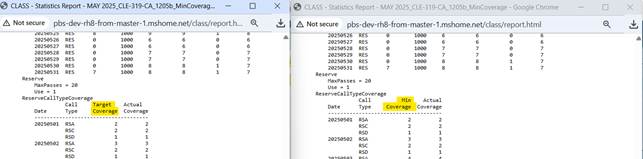
The term "Target Height" has been replaced with "Min Coverage" across the application. This change ensures that the settings more clearly describe their functional purpose: defining the minimum staffing coverage required for specific reserve call types.
Where you will see these changes:
Administrative UI: The configuration screens for reserve allocation now use the more intuitive "Min Coverage" label.
Stats Report: The standard system reports have been updated to reflect "Min Coverage," making it easier to audit staffing targets.
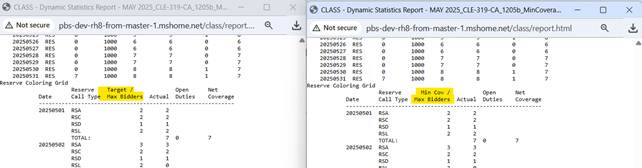
Dynamic Stats Report: Real-time data views now use the updated terminology for better consistency during active bid periods.
Why this matters:
Improved Legibility: "Min Coverage" provides a clearer understanding of how the system is prioritizing reserve assignments.
Consistency: This update aligns the UI with standard operational language used in crew management.
Ease of Use: New administrators will find the system more approachable with self-explanatory labels.
Note: This is a label and display update only. There are no changes to the underlying logic or how the "Min Coverage" values are calculated by the system.
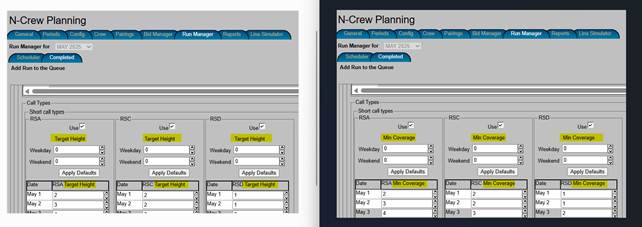
Acceptance criteria
GIVEN a PBS admin for customer with post-process reserve call type allocation
WHEN viewing the run parameters screen, section for short-call parameters minimum coverage numbers
THEN I will see "Min Coverage" instead of "Target Height"
GIVEN a PBS admin for customer with post-process reserve call type allocation
WHEN viewing the Stats report, section showing the short-call minimum coverage numbers, under ReserveCallTypeCoverage
THEN I will see "Min Coverage" instead of "Target Height"
GIVEN a PBS admin for customer with post-process reserve call type allocation
WHEN viewing the Dynamic Stats report, section showing the short-call minimum coverage numbers and long-call max bidders numbers combined, under "Reserve Coloring Grid"
THEN I will see "Min Cov / Max Bidders" instead of "Target / Max Bidders"