
D-50562 Community - Unable to add bid lines in a reserve bid group when a pairing bid group containing a waive statement is copied
Description
Resolved an issue where the "Apply" button would unexpectedly become disabled (greyed out), preventing users from saving new lines. This occurred specifically when a user copied a Pairing Bid Group containing a Waive statement and subsequently added a new bid line to a Reserve Bid Group.
Resolution Details
We updated the validation logic to safely recognize when a target bid group does not support a copied preference. The system will now correctly skip the incompatible check, preventing errors and ensuring that users can continue managing their bid groups smoothly.
D-51859 Community - Days 1-9 in the Bids calendar have lost leading 0
Description
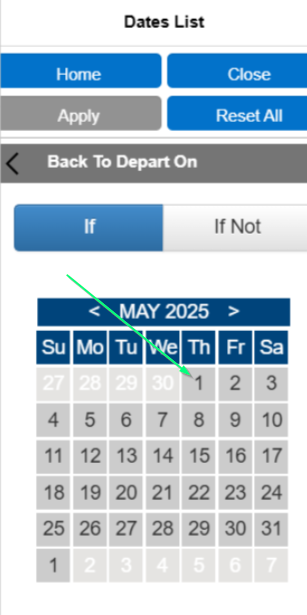
Correct View in 25.7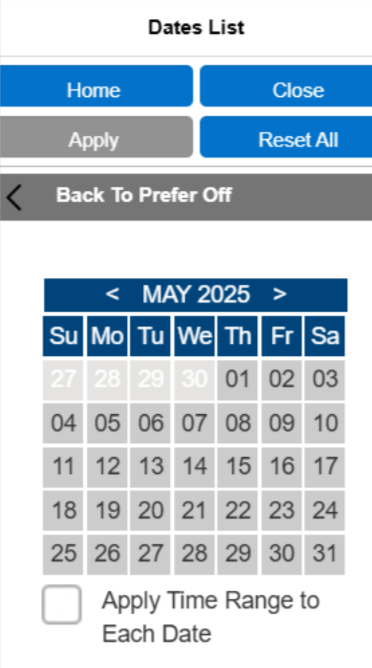
We have restored the standard two-digit date format for the first nine days of the month in the Bids tab calendar. Dates 1-9 will once again display with a leading zero (e.g., "01", "02") for a cleaner and more consistent visual layout.
Resolution Details
The calendar’s display formatting has been updated to automatically restore the leading zero, ensuring a consistent visual experience without disrupting the new background date processing.
D-51680 Community - The delete button is enabled without an equipment row being highlighted/selected, which triggers an exception
Description
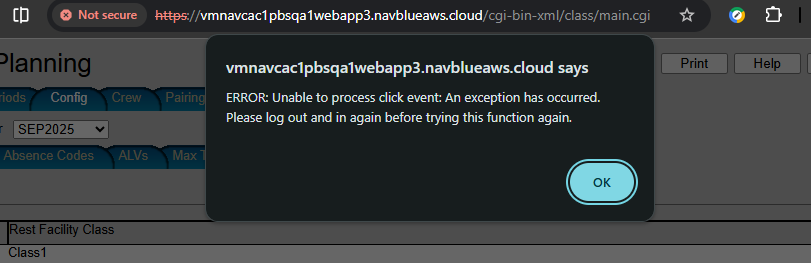
Resolved a system error on the Config > Other tab that previously forced users to log out and log back in to restore functionality. Users can now complete actions on this tab without interruption.
Resolution Details
Equipment List UI Improvements: Navigating your equipment list is now a bit more intuitive thanks to two visual fixes:
The "Delete" button will now automatically disable (grey out) when no equipment is selected or if your list is empty, preventing accidental clicks.
When you click "Cancel" while editing, your previously selected equipment will immediately display its blue selection highlight, so you always know exactly what item is currently selected without needing to click around the screen.
D-50116 Community - Training - Waive Training line can be added below Award Training bid line
Description

The Waive Training line can be added below Award Training bid line
Resolution Details
We have improved the sorting logic for bid lines to ensure a more predictable experience. Previously, training lines were excluded from the standard sorting rules and might appear out of order. Now, all bid line types including training lines will automatically organize correctly so that your highest-precedence lines always appear at the top.
D-51541 Community - NOC Pairing Integrated imports- NOC pairing data is not loaded after the importing is successful
Description

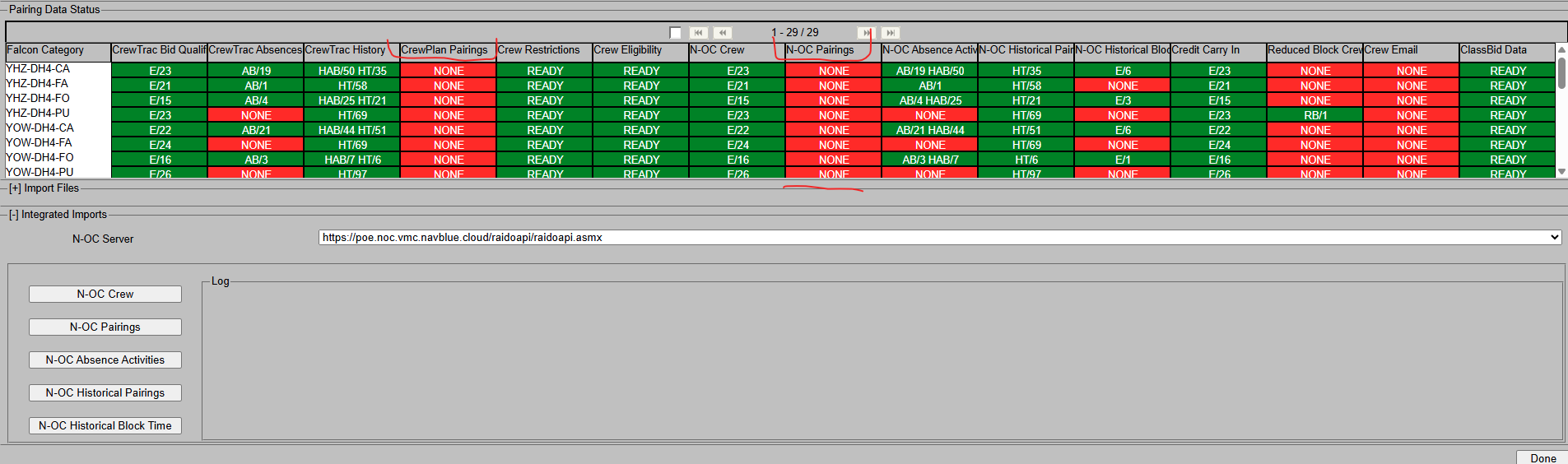
When using Integrated Imports for NOC-Pairing, the system would sometimes silently complete the process even if no data was retrieved from the source. This caused confusion when the user clicked "Confirm" and no new pairings were loaded.
Resolution Details
The import workflow has been updated to detect when no data is available. The system will now display a clear warning message to accurately inform the user that no pairing updates were retrieved, rather than presenting a falsely successful import.
D-50696 Community - Traditional Calendar view shows only February month (missing bid-period carry-in/carry-out days)
Description
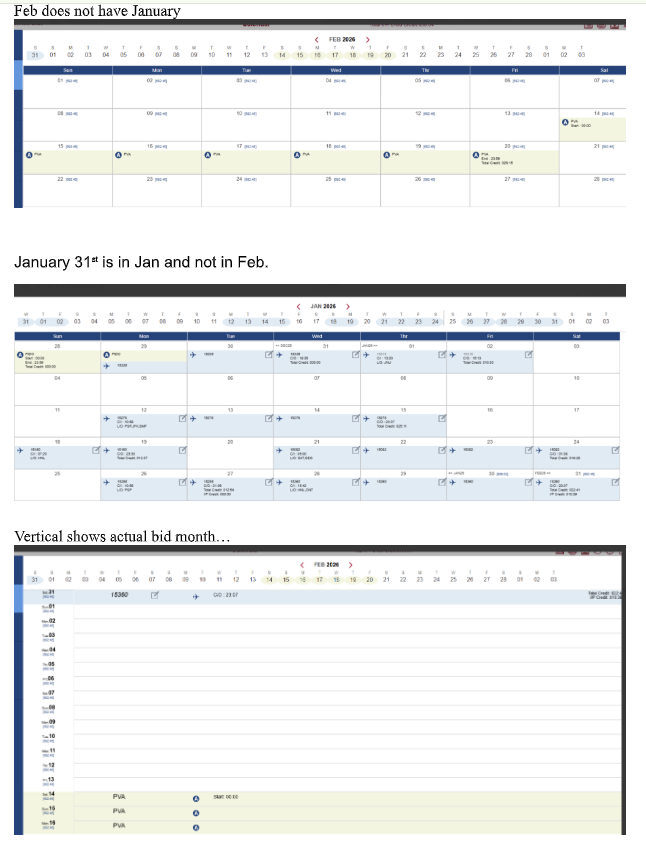
Resolved an issue where the Traditional Calendar view only displayed dates for the strict calendar month, hiding carry-in and carry-out dates belonging to the bid period. The calendar will now correctly display the entire bid period at a glance without requiring you to page back and forth.
Resolution Details
The display logic for the Traditional Calendar has been corrected. It now mirrors the Vertical Calendar's behavior, ensuring the full, accurate bid period is visible by default.
D-50690 Community -Pairing Number Check-In Date (Ordered) setting is removed after reopening editor and clicking Apply
Description
When a user reopened an existing Pairing Number Check-In Date bid line and clicked "Apply," the system would inadvertently drop the previously saved "Ordered" setting. This required the user to notice the change and manually re-enable the toggle.
Resolution Details
Optimized the background save logic for "Ordered" bid preferences. The system now correctly processes and retains your settings when you edit and apply changes to existing bid lines, preventing your preferences from being unintentionally cleared.
D-50299 Community -Delete Period - Display Issue after Executing Run
Description
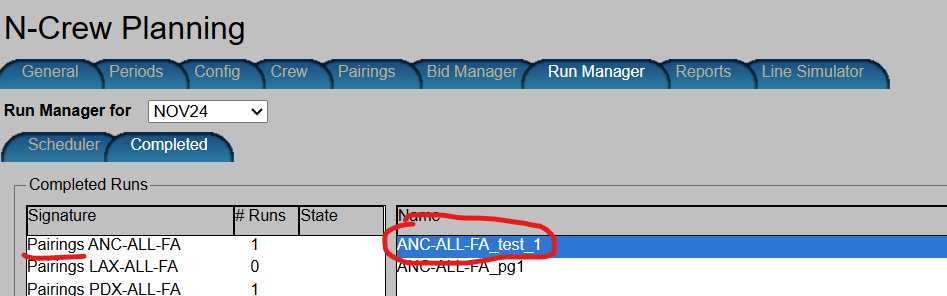
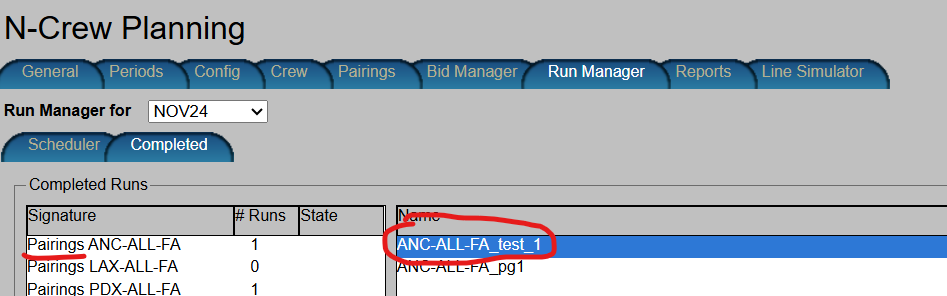
Resolved an issue in the Run Manager where deleting a Period would cause its associated runs to incorrectly display as leftover entries under other Periods and categories. The Run Manager now updates accurately when a Period is deleted, preventing the system errors caused by attempting to click or report on these invalid entries.
Ex.
ALC: ASA
Period: DEC2025
Run Name: ANC-ALL-FA_test_1
After Period DEC2025 deleted
When viewing Period NOV2024
Resolution Details
The system's display logic has been corrected. Deleting a Period now immediately and cleanly removes all associated run data from the Run Manager view, preventing false entries and subsequent reporting errors.
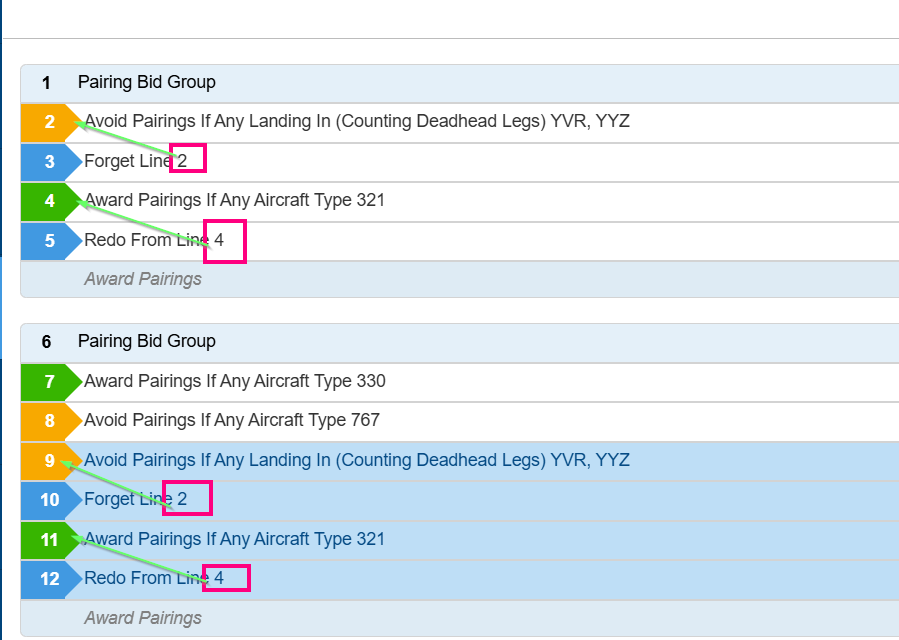
D-51011 Community -Redo From Line and Forget Bid Line with not proper values after copy-paste
Description
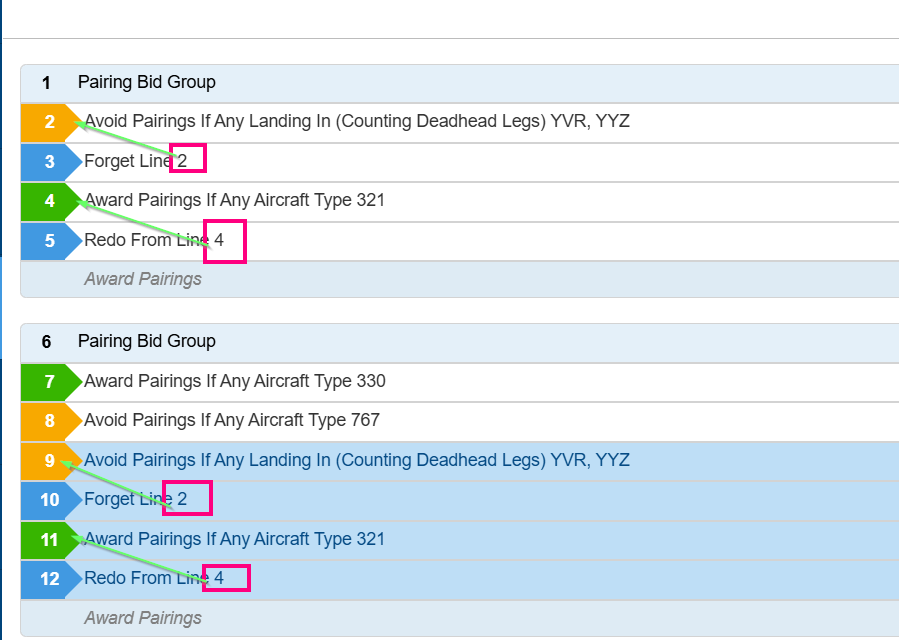
Resolved an issue where copying and pasting Award or Avoid bid lines into a different Pairing Bid Group would cause any associated "Redo From Line" or "Forget Line" indicators to display incorrectly. The system will now accurately update and reference the correct lines when pasted into a new group.
Resolution Details
We have optimized how the application handles your bid lines after you copy and paste them. Previously, hidden, duplicate processes in the background would occasionally step on each other, causing the line order to shift unexpectedly. We have removed these redundant steps so that line updates happen seamlessly, ensuring your bids always stay perfectly arranged in the exact order you want them.
D-50699 Community -RLS- Save and Hide button are hidden when add/editing absence or pairings using Chrome
Description
Save and Hide button are hidden when add/editing absence or pairings using Chrome default setting (100% zoom level):

Resolution Details
Streamlined the background processing for rearranging bid lines after copy-and-paste actions. By removing duplicate logic that caused redundant updates, the system now ensures your bid lines remain in the correct, sequential order without unexpected changes.
D-51515 Community -Min Coverage in the Statistics Report shows values of "undefine"
Description
Resolved an issue where default "Min Coverage" values were not properly sent to the scheduler when launching a run from a fresh template. The system now reliably recognizes and applies the underlying default coverage parameters without requiring the administrator to manually re-save or apply them first.
Resolution Details
The underlying system parameters (ReserveShortCallTypeParameters) have been updated to properly initialize default target heights and coverage boundaries to zero ($0$) when no data is present, correcting the report display
D-51859 Community - Days 1-9 in the Bids calendar have lost leading 0
Description
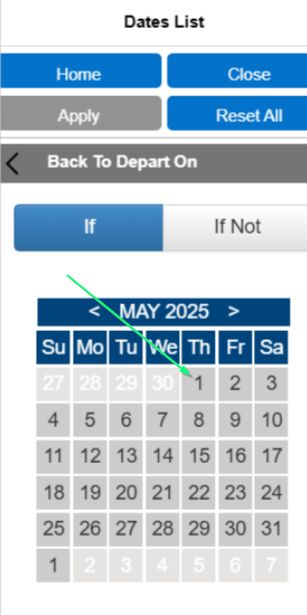
Correct View in 25.7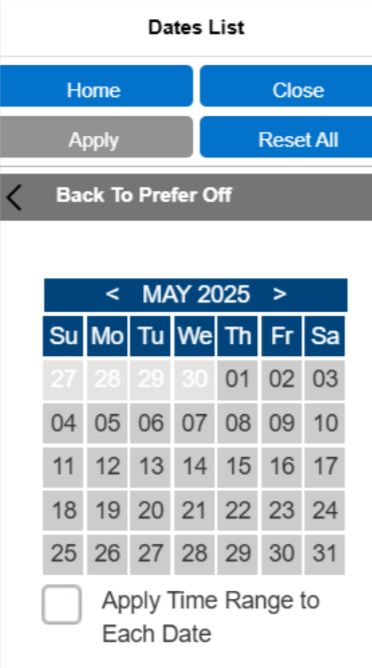
We have restored the standard two-digit date format for the first nine days of the month in the Bids tab calendar. Dates 1-9 will once again display with a leading zero (e.g., "01", "02") for a cleaner and more consistent visual layout.
Resolution Details
The calendar’s display formatting has been updated to automatically restore the leading zero, ensuring a consistent visual experience without disrupting the new background date processing.
D-51680 Community - The delete button is enabled without an equipment row being highlighted/selected, which triggers an exception
Description
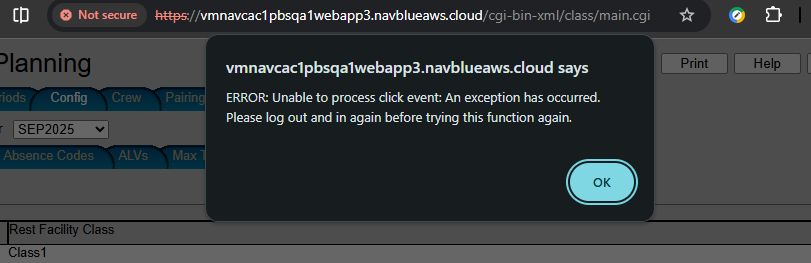
Resolved a system error on the Config > Other tab that previously forced users to log out and log back in to restore functionality. Users can now complete actions on this tab without interruption.
Resolution Details
Equipment List UI Improvements: Navigating your equipment list is now a bit more intuitive thanks to two visual fixes:
The "Delete" button will now automatically disable (grey out) when no equipment is selected or if your list is empty, preventing accidental clicks.
When you click "Cancel" while editing, your previously selected equipment will immediately display its blue selection highlight, so you always know exactly what item is currently selected without needing to click around the screen.
D-50116 Community - Training - Waive Training line can be added below Award Training bid line
Description

The Waive Training line can be added below Award Training bid line
Resolution Details
We have improved the sorting logic for bid lines to ensure a more predictable experience. Previously, training lines were excluded from the standard sorting rules and might appear out of order. Now, all bid line types including training lines will automatically organize correctly so that your highest-precedence lines always appear at the top.
D-51541 Community - NOC Pairing Integrated imports- NOC pairing data is not loaded after the importing is successful
Description

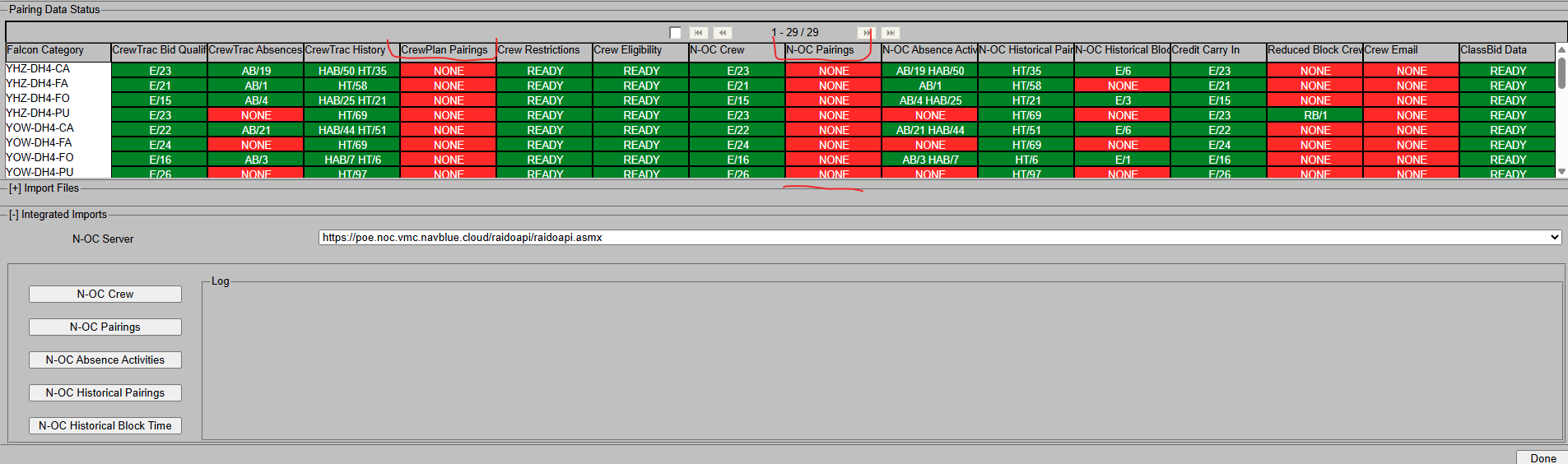
When using Integrated Imports for NOC-Pairing, the system would sometimes silently complete the process even if no data was retrieved from the source. This caused confusion when the user clicked "Confirm" and no new pairings were loaded.
Resolution Details
The import workflow has been updated to detect when no data is available. The system will now display a clear warning message to accurately inform the user that no pairing updates were retrieved, rather than presenting a falsely successful import.
D-50696 Community - Traditional Calendar view shows only February month (missing bid-period carry-in/carry-out days)
Description
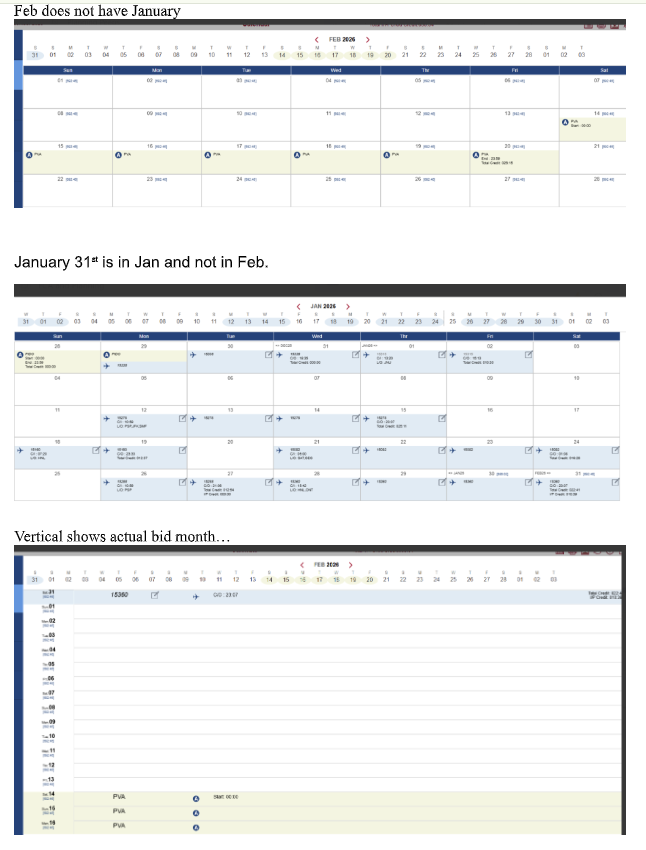
Resolved an issue where the Traditional Calendar view only displayed dates for the strict calendar month, hiding carry-in and carry-out dates belonging to the bid period. The calendar will now correctly display the entire bid period at a glance without requiring you to page back and forth.
Resolution Details
The display logic for the Traditional Calendar has been corrected. It now mirrors the Vertical Calendar's behavior, ensuring the full, accurate bid period is visible by default.
D-50690 Community -Pairing Number Check-In Date (Ordered) setting is removed after reopening editor and clicking Apply
Description
When a user reopened an existing Pairing Number Check-In Date bid line and clicked "Apply," the system would inadvertently drop the previously saved "Ordered" setting. This required the user to notice the change and manually re-enable the toggle.
Resolution Details
Optimized the background save logic for "Ordered" bid preferences. The system now correctly processes and retains your settings when you edit and apply changes to existing bid lines, preventing your preferences from being unintentionally cleared.
D-50299 Community -Delete Period - Display Issue after Executing Run
Description
Resolved an issue in the Run Manager where deleting a Period would cause its associated runs to incorrectly display as leftover entries under other Periods and categories. The Run Manager now updates accurately when a Period is deleted, preventing the system errors caused by attempting to click or report on these invalid entries.
Ex.
ALC: ASA
Period: DEC2025
Run Name: ANC-ALL-FA_test_1
After Period DEC2025 deleted
When viewing Period NOV2024
Resolution Details
The system's display logic has been corrected. Deleting a Period now immediately and cleanly removes all associated run data from the Run Manager view, preventing false entries and subsequent reporting errors.
D-51011 Community -Redo From Line and Forget Bid Line with not proper values after copy-paste
Description
Resolved an issue where copying and pasting Award or Avoid bid lines into a different Pairing Bid Group would cause any associated "Redo From Line" or "Forget Line" indicators to display incorrectly. The system will now accurately update and reference the correct lines when pasted into a new group.
Resolution Details
We have optimized how the application handles your bid lines after you copy and paste them. Previously, hidden, duplicate processes in the background would occasionally step on each other, causing the line order to shift unexpectedly. We have removed these redundant steps so that line updates happen seamlessly, ensuring your bids always stay perfectly arranged in the exact order you want them.
D-50699 Community -RLS- Save and Hide button are hidden when add/editing absence or pairings using Chrome
Description
Save and Hide button are hidden when add/editing absence or pairings using Chrome default setting (100% zoom level):

Resolution Details
Streamlined the background processing for rearranging bid lines after copy-and-paste actions. By removing duplicate logic that caused redundant updates, the system now ensures your bid lines remain in the correct, sequential order without unexpected changes.
D-51515 Community -Min Coverage in the Statistics Report shows values of "undefine"
Description
Resolved an issue where default "Min Coverage" values were not properly sent to the scheduler when launching a run from a fresh template. The system now reliably recognizes and applies the underlying default coverage parameters without requiring the administrator to manually re-save or apply them first.
Resolution Details
The underlying system parameters (ReserveShortCallTypeParameters) have been updated to properly initialize default target heights and coverage boundaries to zero ($0$) when no data is present, correcting the report display
D-51351 [JZA/Community] Vacation Extension-The Vacation GDO day is overlapped with Historical pairings which is incorrect
Description
We have resolved an issue that allowed crew members to inadvertently select Vacation Extension (GDO) days that conflicted with their existing schedules.
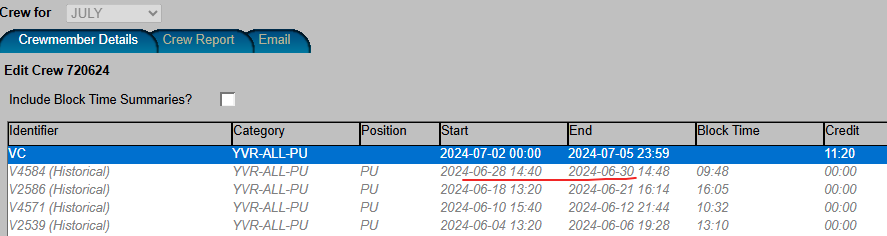
Previously, the system permitted users to select a GDO on dates that already contained historical pairings rolling over from the previous scheduling period. This could lead to overlapping assignments on the same day.
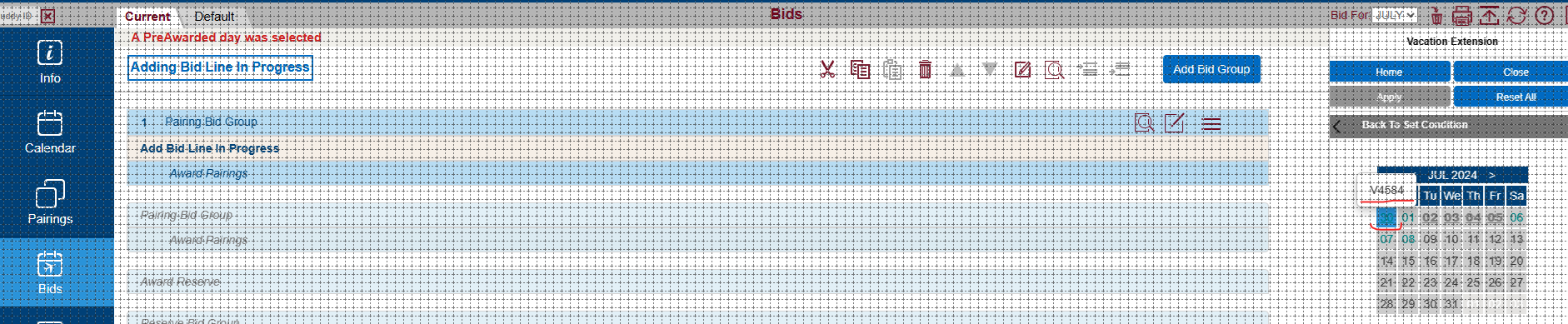
We have updated the system's logic to properly recognize these existing assignments. Now, if a date already contains a historical pairing, the system will correctly disable that date and prevent it from being selected as a Vacation GDO, ensuring a clean and conflict-free schedule.
Resolution Details
Previously, it was possible to select a specific date for a vacation extension even if the crew member already had another activity scheduled for that same day.
Now, the system automatically checks the schedule first. If a crew member already has an activity taking place on a specific date, the system will disable that date and prevent it from being selected as a vacation extension. This ensures all schedules remain accurate and conflict-free.
D-52303 [POE/Community] Webapp-Unable to add Waive vacation GDO bids for both Pairing and Reserve groups
Description
We have fixed an issue that prevented users from successfully submitting waivers for their Vacation Extension (GDO) days.
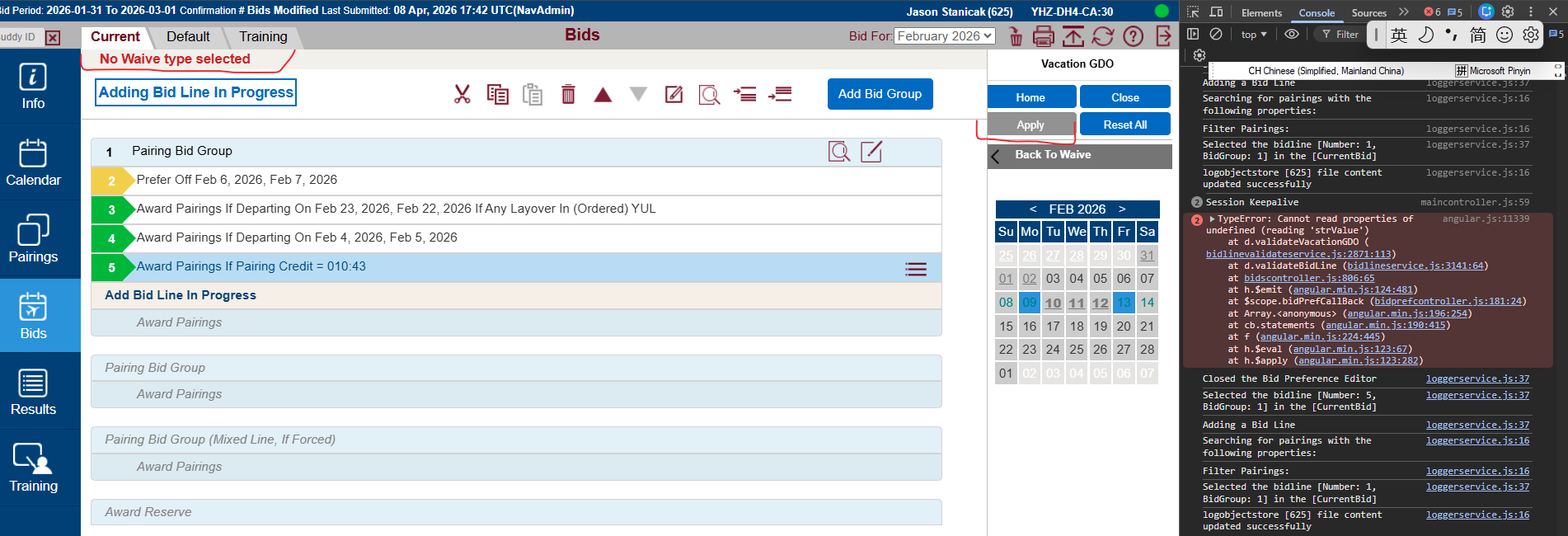
Previously, when selecting GDO days to waive, an incorrect "No Waive Type selected" message would appear at the top of the Bid screen, and the "Apply" button would become disabled (greyed out). This prevented you from saving your selections and moving forward.
We have corrected this behavior so the system now properly recognizes your input. Now, when you select your GDO days to waive, the "Apply" button will remain active, allowing you to successfully submit your preferences without any roadblocks.
Resolution Details
We have resolved an issue that could cause an unexpected system error when processing vacation extensions.
Previously, if specific details regarding a crew member's vacation length were missing from the system, it could trigger an error that interrupted the process. We have enhanced the system's background validation so it now safely checks for this information before moving forward. This ensures that even if data is missing, the system will handle it gracefully, providing a smoother and more stable experience without crashing.
D-52264 Community- Include HolidayDate into PeriodCopy process and CreateTable.sql
Description
We have streamlined the process used to copy scheduling periods from your live Production environment into your UAT (Testing) environment.
Previously, when you requested a specific period be copied over for testing or troubleshooting purposes, the system's background transfer tool would inadvertently leave out the designated holiday dates. This required manual workarounds to ensure your testing data was complete.
We have updated our internal data transfer processes so that all holiday information is now automatically and seamlessly included. This ensures your testing environments are populated faster and accurately reflect your live production schedules.
Resolution Details
Added the table to the Period Copy script as well as the CreateTables.sql file.
D-52208 Community- Bidding Info message displays unformatted HTML/encoded characters in Bidder UI
Description
We have fixed an issue that caused "Bidding Info" messages to display incorrectly in the Bidder interface.
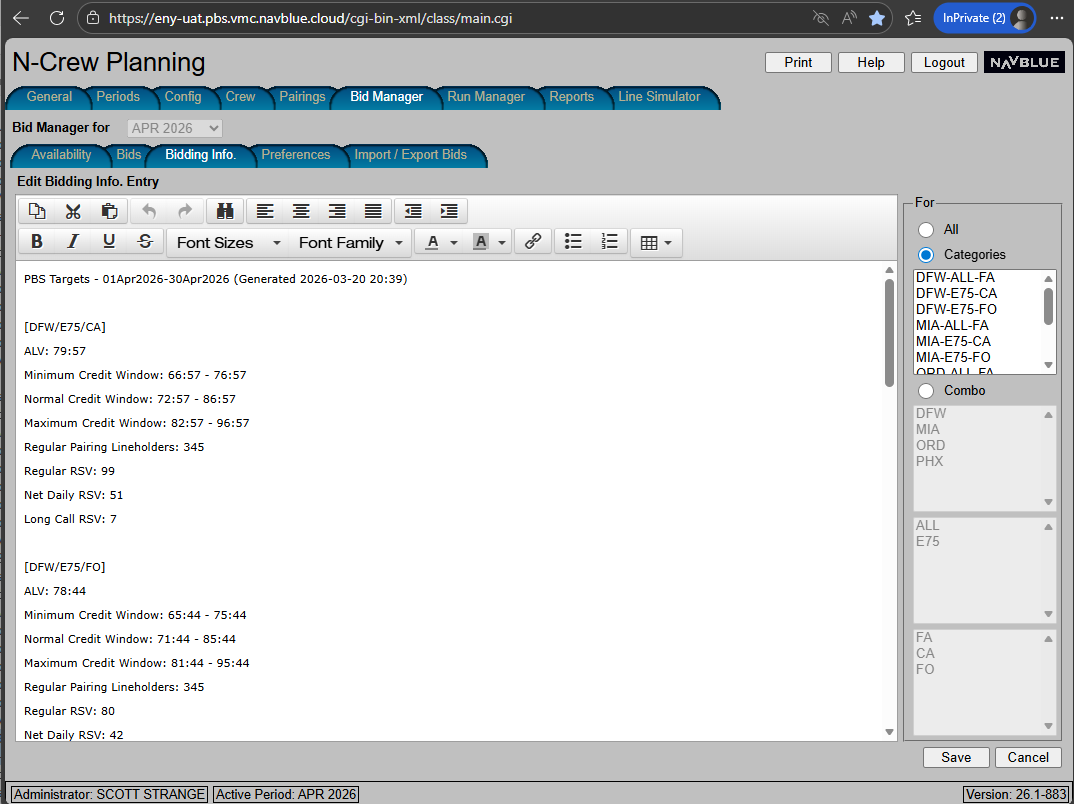
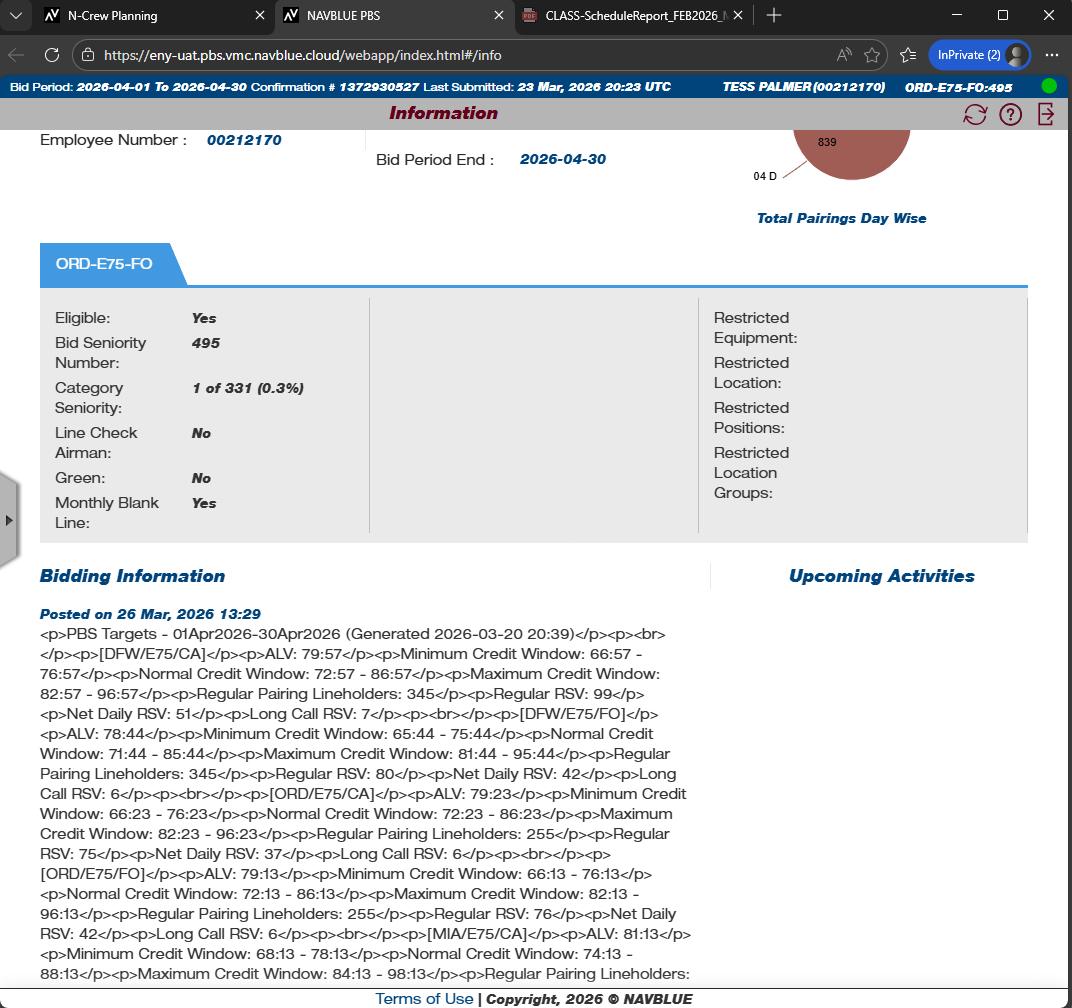
Recently, when administrators created and published these announcements, the text formatting would break. Instead of seeing a clean, readable message, bidders were seeing visible computer code and raw HTML tags (such as <p>) mixed in with the text. This formatting issue persisted regardless of whether the message was typed directly into the editor or pasted from another source.
We have corrected the underlying system logic responsible for processing this text. Moving forward, all "Bidding Info" messages will display seamlessly to your bidders, preserving the exact formatting and layout intended by the administrator.
Resolution Details
Previously, the system was misinterpreting the background code used for text formatting, causing the messages to save improperly behind the scenes. This resulted in broken text and visible HTML tags when viewed by your bidders.
We have corrected how the system processes and stores this information. Now, the system accurately captures and saves all text and formatting exactly as the administrator enters it. Any announcements you create or edit moving forward will retain their proper structure and display cleanly and professionally for your users.
D-51262 Community- Improper Validation of "Time Off After = 0 Days" in PBS Bidder
Description
We have updated the bidding interface to prevent confusing errors when submitting specific pairing bids.
Previously, the system allowed you to enter "0 Days" when setting a "Time Off After" condition (for example, requesting a specific layover with 0 days off afterward). While the screen allowed this entry, the system actually requires a minimum of 1 day for this rule. This mismatch caused the entire bid submission to fail with a generic "Unable to Submit Bid" error, leaving you without a clear reason why the bid was rejected.
To prevent this frustration, we have updated the interface so it no longer accepts "0" in the "Days" field for these conditions. This ensures your bids are built correctly from the start, resulting in smoother, error-free submissions.
Resolution Details
Previously, the interface allowed you to input "0 days" when configuring a "Time Off After" condition. However, the system's underlying rules require a minimum of one day off for this condition to be valid. Because of this mismatch, bids saved with "0 days" would fail when you attempted to submit them.
We have updated the input field so it now strictly enforces the minimum requirement of 1 day. By preventing the entry of "0" days upfront, the system ensures your bid conditions are valid from the moment you create them, eliminating frustrating submission failures.