
S-106923 Community - Add Absences information to the Result Report
Description
Feature: Custom Results Reports with Detailed Absences
Description: The Results tab has been updated to give users more control over how absence data is displayed and reported.
Details:
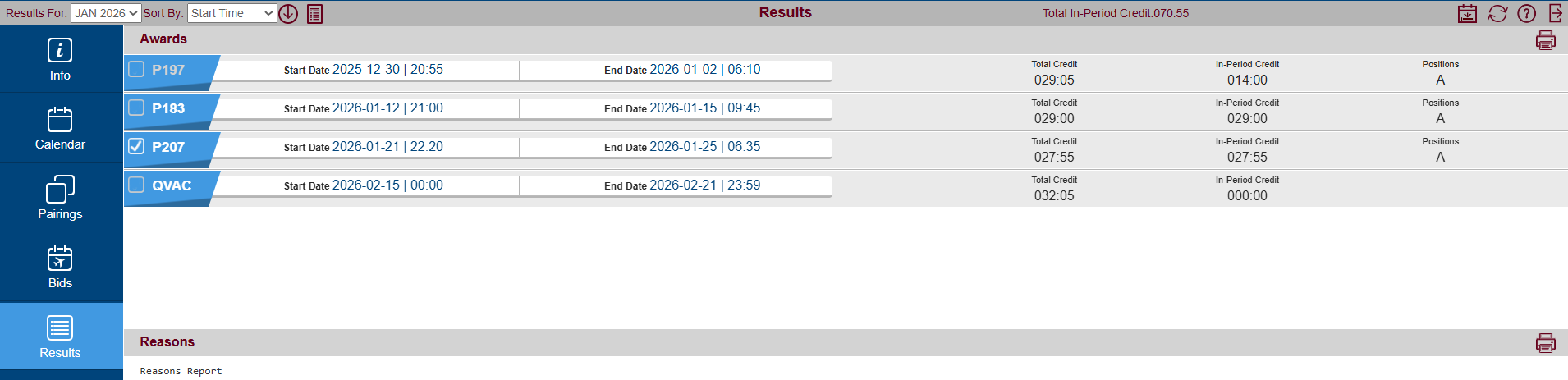
Users can now mark or unmark individual absence records within the Results tab.
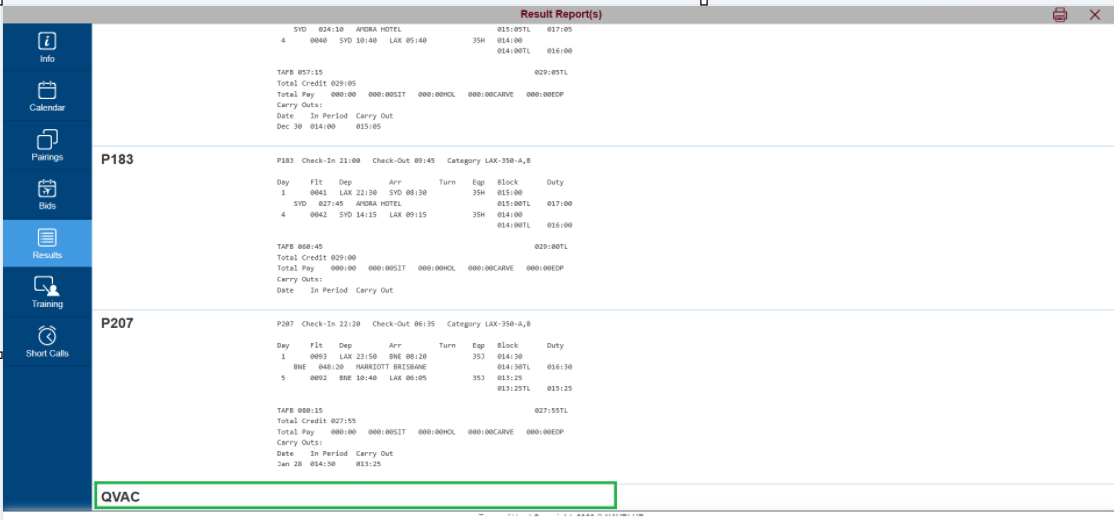
The logic for the "Show Results Report" button has been enhanced: checking specific items will filter the resulting report to show only those selections. If no records are checked, the report provides a full overview of all available awards and absences.
The Results Report now provides detailed metrics for absences, explicitly displaying the Start Date/Time, End Date/Time, Total Credit, and In Period Credit.
Acceptance criteria
GIVEN any bidder
WHEN they have an absence in their schedule, and the bidder clicks the show results report option
THEN the result report will contain detailed absence information
S-64281 Community - Add Ordered to Layover Bid
Description
Feature: Ordered Preferences for Layover Stations
Description: The Bid UI has been enhanced to allow users to save and process Layover Stations in a specific order of preference.
Details:
A new "Ordered" (YES/NO) selection has been added specifically to the Layover "Stations" sub-option.
The resulting bid syntax will explicitly display this choice (e.g., Award Pairings If Any Layover in (Ordered) NRT, PVG And On Aug 2, 2024).
Validation Rules: To maintain valid bid logic, the system will enforce the following restrictions, displaying an on-screen warning and greying out the "Apply" button if a conflict is detected:
"Ordered" cannot be combined with "Avoid" or "If Not".
"Ordered" cannot be used with linked bids (Followed-By or Hub-Turn).
"Ordered" cannot be used with the "Every" property.
A single Award bid line cannot contain more than one "Ordered" property.
Key Rules
Bid UI should disallow "Ordered" from being used with a link bid (Followed-By
 (used by lots of customers) or Hub-Turn
 (used only by HALC)). Bid UI already does this for Followed-By and Hub-Turn for existing properties with Ordered -The error message should be displayed. (Screen 1, Screen 2)
Screen 1

Screen 2

Acceptance criteria
GIVEN any ALC bidder
WHEN logged into the system and in the in an award pairing Layover Stations screen
THEN I will see the new Ordered option with two values "YES" & "NO"
GIVEN any ALC bidder in an award pairing Layover Stations screen
WHEN If, Any & Ordered Yes options are selected
THEN I should be able to add stations in my preferred order
&
The bid line will say "Award Pairings If Any Layover in ( Ordered ) Station1, Station2, Station3"
GIVEN any ALC bidder in the award pairing Layover Stations screen
WHEN the Ordered option is selected as "NO" and the bidder adds or edits bid preference line
THEN the bid line will display the stations in the order in which the bidder added them without the Ordered word in the bid preference line.
GIVEN any ALC bidder in the award pairing Layover Stations screen
WHEN the "If Not" option is selected and the Ordered option is selected as "Yes"
THEN the apply button will be greyed out and the system will display a message "CurrentBid: The ordered option is not allowed with negative property of a bid."
GIVEN any ALC bidder in the award pairing Layover Stations screen
WHEN the "Every" option is selected and the Ordered option is selected as "Yes"
THEN the apply button will be greyed out and the system will display a message "CurrentBid: The ordered option is not allowed with every property of a bid."
GIVEN any ALC bidder
WHEN editing/adding an award pairing bid line with an existing ordered bid preference, and when adding a new ordered bid preference
THEN the apply button will be greyed out and the system will display a message "CurrentBid: The ordered option is not allowed on more than 1 bid preference in the same bid line."
GIVEN any ALC bidder
WHEN viewing the award pairing bid preferences and in the Layover "Of Duration" menu
I will see NOT the new Ordered option.
GIVEN any ALC bidder
WHEN viewing the award pairing bid preferences and in the Layover On screen
I will see NOT the new Ordered option.
GIVEN any ALC bidder
WHEN viewing the award pairing bid preferences and in the Layover Starting At screen
I will see NOT the new Ordered option.
GIVEN any ALC bidder
WHEN creating/editing layover stations ordered
THEN I can't add a followed by construction or bid preference ( UI message "CurrentBid: The Ordered option is not allowed within any property of a bid containing FollowedBy." )
GIVEN an HALC bidder
WHEN creating/editing layover stations ordered
THEN I can't add a Hub Turn construction or bid preference ( UI message "CurrentBid: The Ordered option is not allowed within any property of a bid containing HubTurn." )
S-64282 Community - Add Ordered to Pairing Number Bid
Description
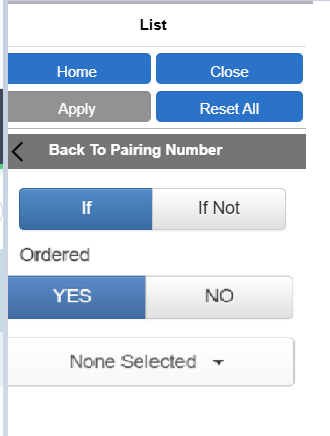
You can now prioritize specific Pairing Numbers in a preferred sequence. A new "Ordered" (YES/NO) toggle is available within the Pairing Number list option.
Update: Selecting "YES" ensures the system processes and awards the pairing numbers in the exact order you listed them.
Update: To ensure your bids process correctly, the system will restrict the "Ordered" option from being used alongside incompatible criteria. "Ordered" cannot be used with:
Linked bids ("Followed-By" or "Hub-Turn")
"If Not" or "Avoid" statements
Another "Ordered" property within the exact same bid line (only one Ordered property is allowed per line).
Acceptance criteria
Given any ALC bidder
WHEN logged into the system and in the in an award pairing Pairing Number List screen
THEN I will see the new Ordered option with two values "YES" & "NO"
GIVEN any ALC bidder in an award pairing, Pairing Number List screen
WHEN If & Ordered Yes options are selected
THEN I should be able to add Pairing Numbers in my preferred order
&
The bid line will say "Award Pairings If Pairing Numbers ( Ordered ) PairingNumber1, PairingNumber2, PairingNumber3 "
GIVEN any ALC bidder in the award pairing, Pairing Number List screen
WHEN the Ordered option is selected as "NO"
THEN the bid line will display the pairing number in the order in which the bidder added THEM without the Ordered word in the bid preference line.
GIVEN any ALC bidder in the award pairing, Pairing Number List screen
WHEN the "If Not" option is selected and the Ordered option is selected as "Yes"
THEN the apply button will be greyed out and the system will display a message "CurrentBid: The ordered option is not allowed with negative property of a bid."
GIVEN any ALC bidder
WHEN editing an award pairing bid line with an existing ordered bid preference, and when adding a new ordered bid preference in the same bid line
THEN the apply button will be greyed out and the system will display a message "CurrentBid: The ordered option is not allowed on more than 1 bid preference in the same bid line."
GIVEN any ALC bidder
WHEN logged into the system and in the Pairing Number Condition screen
I will see NOT the new Ordered option.
GIVEN any ALC bidder
WHEN creating/editing Pairing Number list ordered
THEN I can't add a followed by construction or bid preference ( UI message "CurrentBid: The Ordered option is not allowed within any property of a bid containing FollowedBy." )
GIVEN an HALC bidder
WHEN creating/editing pairing number list ordered
THEN I can't add a Hub Turn construction or bid preference ( UI message "CurrentBid: The Ordered option is not allowed within any property of a bid containing HubTurn." )
GIVEN any ALC bidder
WHEN viewing the avoid pairing bid preferences and in the Pairing Number screen
I will see NOT the new Ordered option.
S-100686 Community - Apply Midnight offset to credit calculations when absences carry over to the next day
Description
Feature: Midnight Offset Option for Absence Credit Calculations
Description: A new configuration setting has been introduced to give airlines the option to apply their midnight offset rules when the system automatically calculates absence credits.
Details:
When enabled, the system will respect the airline's configured midnight offset when calculating the days touched and credits for newly created absence activities.
This logic applies system-wide, covering absences generated via data imports (both in-period and historical carry-in absences) as well as those added manually by an administrator in the UI.
Note: This is an optional configuration. Airlines that previously required this logic for specific imports will have it seamlessly enabled during the update to maintain continuity.
Acceptance criteria
GIVEN a PBS admin
WHEN viewing the global rules, midnightoffsetoption
THEN I will be able to see the new param "ApplyToAbsenceCreditCalculations"
&
for SCX and ASAP the new param "ApplyToAbsenceCreditCalculations" will have the value true(1).
&
for other customers the new param "ApplyToAbsenceCreditCalculations" will have the value false(0).
GIVEN an ASAP or SCX admin with the option ApplyToAbsenceCreditCalculations set to true
WHEN importing a historical carry-in absence which ends before the midnightoffset on the first day of the period and starts on the last day of the previous bid period
THEN the inperiod credit for the absence will be zero and then the total credit will be 1 day's worth of absence code's credit.
&
WHEN if the ApplyToAbsenceCreditCalculations is set to false
The inperiodcredit & total credit will increase to include the extra day.
GIVEN an ASAP or SCX admin with the option ApplyToAbsenceCreditCalculations set to true
WHEN importing an in-period absence which ends before the midnightoffset on an in-period day
THEN the inperiod credit & total credit for the absence will not count the absence as touching that final day
&
WHEN if the ApplyToAbsenceCreditCalculations is set to false
The inperiodcredit & total credit will increase to include the extra day.
GIVEN an ASAP or SCX admin with the option ApplyToAbsenceCreditCalculations set to true
WHEN adding an in period absence manually via admin UI which ends before the midnightoffset
THEN the inperiod credit for the absence will not count the absence as touching that final day
&
WHEN if the ApplyToAbsenceCreditCalculations is set to false
The inperiod credit will increase to include the extra day.
S-106936 Community - Block the ability from the pairings tab to add a specific pairing with a number selected in conjunction with a pairing with no date selected.
Description
Enhancement: Pairing Selection Date Validation
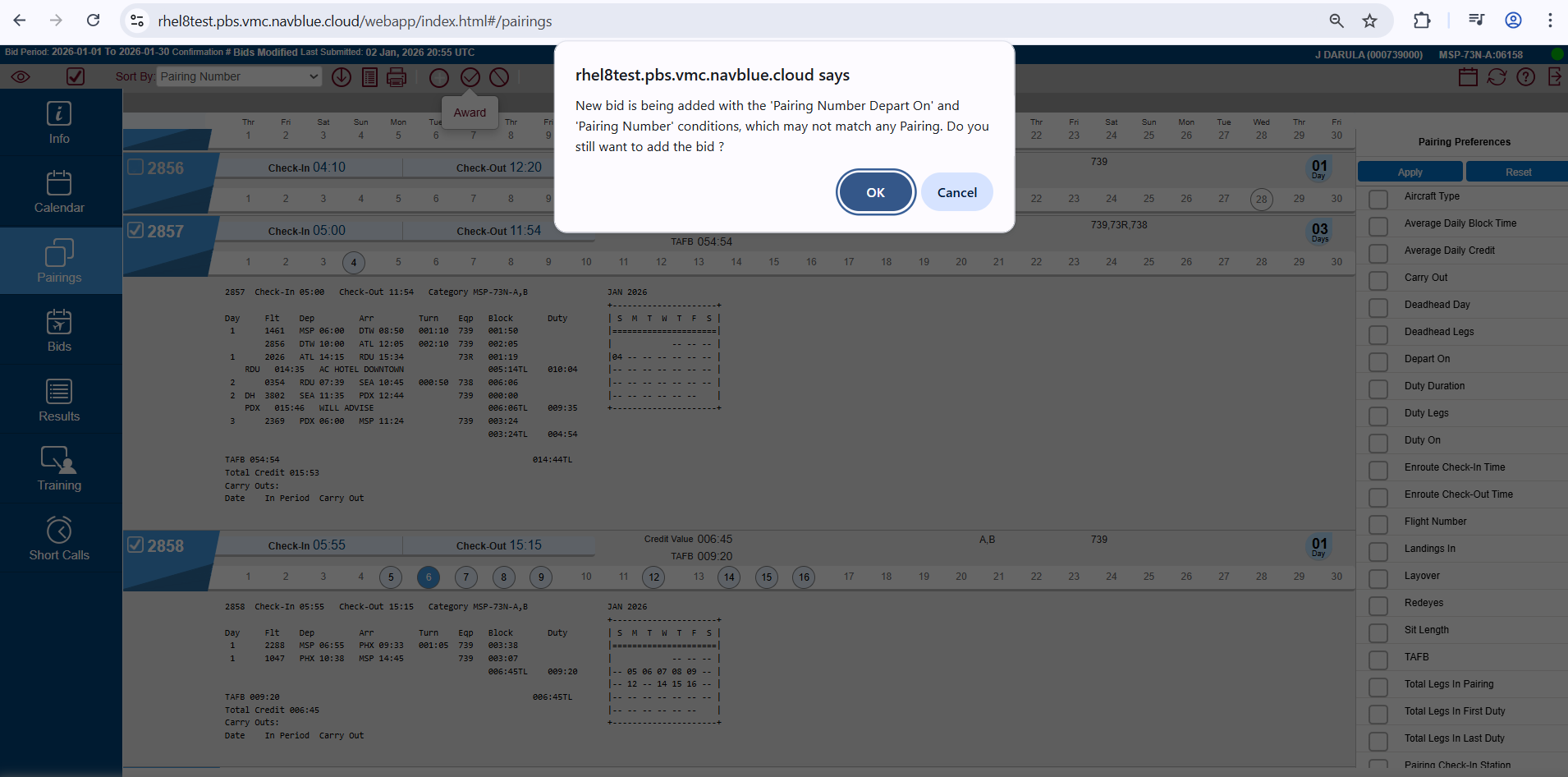
Behavior Change: The system has been updated to strictly enforce consistent date selections when adding multiple pairings. Users are no longer permitted to submit a bid that mixes pairings with specific departure dates and pairings without dates.
UI Update: The previous warning prompt has been changed to a strict block. Users attempting this action will now receive an error message guiding them to update their selections to be consistent (either all having a 'Departing On' date, or none at all). The bid will not be added until the selections match.
Acceptance criteria
GIVEN a PBS bidder in the pairings tab
WHEN they check a pairing with no dates (Pairing Number Departing on) selected, and a pairing with dates (Pairing Number Departing on) selected
THEN the system will display the new error message and the bid options will not be added
GIVEN a PBS bidder in the pairings tab
WHEN all checked pairings have dates (Pairing Number Departing on) selected
THEN the system will not display the new error message, and the bid options will be added
GIVEN a PBS bidder in the pairings tab
When all checked pairings have no dates (Pairing Number Departing on) selected
Then the system will not display the new error message, and the bid options will be added
S-106883 Community - Duty on/Date/Days of Week List UI display Fix
Description
OLD VERSION 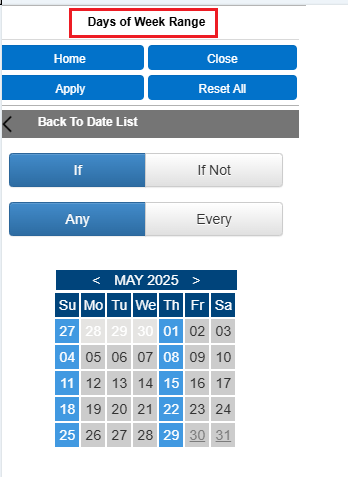
NEW VERSION
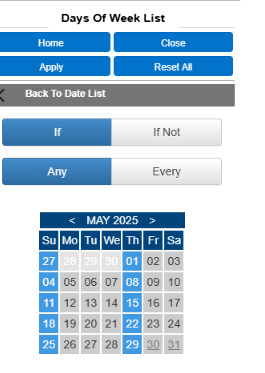
Enhancement: Menu Text Update for 'Duty On' Preferences
Description: Resolved a minor text discrepancy in the bid preference menus to better reflect the tool's actual function.
Details: When navigating to the "Duty On" bid preference and selecting the date option, the header for the sub-menu has been renamed from "Days of Week Range" to "Days of Week List".
Acceptance criteria
GIVEN any bidder in the bids tab
WHEN they are in the Duty on -> Date -> Days of Week List bid preference option
THEN they will see the "Days of Week List" text
GIVEN any bidder in the Pairings tab
WHEN they are in the Duty on -> Date -> Days of Week List bid preference option
THEN they will see the "Days of Week List" text
S-104398 Community - Improve the error message when adding a bid line from the pairings tab, but no bid group has yet been created by the user
Description
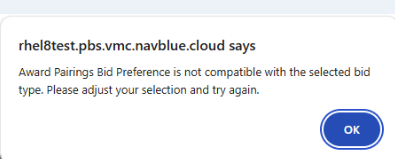
We have updated our system alerts to be more helpful when you are building your bids. If you try to add a bid preference from the Pairings tab before you have created any bid groups, you will no longer receive a generic error. Instead, the system will provide exact instructions on how to go back to the Bids tab, set up and highlight your bid line, and successfully return to the Pairings tab to finish adding your bid.
Current Error Message
Acceptance criteria
GIVEN a PBS Bidder with no user-generated bid group
WHEN adding an award bid line from the pairings tab
THEN the user should see the new error message.
GIVEN a PBS Bidder with no user generated bid group
WHEN adding an avoid bid line from the pairings tab
THEN the user should see the new error message.
S-99982 Community - Scheduler work (for 2 new Ordered bid properties)
Description
Enhancement: Scheduler Processing for Ordered Preferences
Description: The system's scheduling logic has been updated to natively process prioritized lists for Layover Stations and Pairing Numbers within Award bids.
Details:
The scheduler evaluates "Ordered" items strictly sequentially. It does this by dividing the ordered list into separate, prioritized internal steps (e.g., evaluating station 1 entirely before moving to station 2).
Safety Check: In the rare event that an "Ordered" command bypasses UI restrictions and is submitted alongside an incompatible parameter (such as "Every"), the scheduler is programmed to safely ignore the sequence and process the bid normally to prevent system errors.
Acceptance criteria
GIVEN a run where a person has used award pairings if layover station ( ordered )
WHEN -processing this bid
THEN the scheduler will treat it as a list of preference ordered bids ( one for each layover station).
GIVEN a run where a person has used award pairings if pairing number ( ordered )
WHEN -processing this bid
THEN the scheduler will treat it as a list of preference ordered bids ( one for each pairing number).
S-99172 Community - Enable add bids mode - Auto active
Description
Screen 1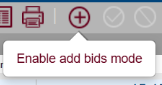
Screen 2

"Add Bids" mode is now always enabled by default in the Pairings, Trainings, and Short Calls tabs. The manual toggle button has been removed, meaning the Award and Avoid icons are permanently active and ready to use, streamlining your bidding process.
Acceptance criteria
GIVEN a PBS bidder
WHEN I click on the pairings tab
THEN I will see that the Add Bids Mode button is deleted
AND
THEN The Avoid and Award icons are constantly active
GIVEN a PBS bidder
WHEN I click on the trainings tab
THEN I will see that the Add Bids Mode button is deleted
AND
THEN The Avoid and Award icons are constantly active
GIVEN a PBS (Delta) bidder
WHEN I click on the short calls tab
THEN I will see that the Add Bids Mode button is deleted
AND
THEN The Award icon is constantly active
S-106884 Community - Go Back & Go Forward Shortcut Fix
Description
Enhancement: Improved Navigation Shortcut Synchronization
Description: The system now properly synchronizes the visual interface with back and forward navigation commands.
Details: Using keyboard or system shortcuts to navigate backward or forward will now reliably load the intended screen. Additionally, the corresponding tab in the menu will automatically highlight to accurately reflect the user's active page.
Acceptance criteria
GIVEN any bidder
When they use the go back short cut ( either left arrow on the browser or alt + left arrow on the keyboard or the back button on the mouse)
Then the application should navigate backwards, and the appropriate tab should be selected.
GIVEN any bidder
When they use the go forward shortcut ( either right arrow on the browser or alt + right arrow on the keyboard or the forward button on the mouse)
Then the application should navigate forward and the appropriate tab should be selected.
S-99181 Community - Error Messaging JCTE & CrewTrac
Description
Enhancement: Improved Import Status and Error Messaging
Description: The system's data import framework has been optimized to improve communication between the background processing and the user interface.
Details:
Users running data imports (starting with JCTE and CrewTrac integrations) will now receive timely, descriptive status updates as the import runs.
In the event of an import failure or data conflict, the system will instantly generate specific, actionable error messages to aid in troubleshooting.
Acceptance criteria
GIVEN a PBS admin
WHEN importing files & there is an issue
THEN I'll see the updated error message
S-107701 Community - Carry out Credit Database Schema change & related code changes
Description
Infrastructure Update: Dedicated Database Tracking for Carryout Credit
Description: The system's underlying data model has been re-engineered to separate Carryout Credit tracking from standard in-period calculations.
Details:
Introduced a dedicated database storage column specifically for Carryout Credit, removing the need for real-time derivative calculations.
Updated all core scheduling engines, report generation logic, and data tracking helpers to query the new independent field natively.
Synchronized all data import tools to populate the new database fields simultaneously with standard credit processing, ensuring complete backward compatibility and system-wide consistency.
Acceptance criteria
GIVEN a developer
WHEN viewing the PairingOnDate table
THEN I will see the new column CarryOutCredit ( database )
GIVEN a developer
WHEN the pairings file is loaded
THEN the PairingOnDate/CarryOutCredit column ( database) will be updated properly
GIVEN any ALC Admin
WHEN viewing the pairings report
THEN the values shown in the report should exactly match the values that were shown prior to making this change.
S-107739 Community - Pairing Carry out Credit - Bidder UI work
Description
Infrastructure Update: Streamlined Interface Logic for Carryout Credit
Description: Following the introduction of a dedicated database column for Carryout Credit, the Bidder UI data pipeline has been aligned to pull this data natively.
Details: The interface now communicates carry-out credit values directly through the background PairingOnDate object. By reading this value as a stored property rather than computing it dynamically on the client side, data integrity is improved and front-end rendering performance is optimized.
Acceptance criteria
GIVEN any ALC Admin
WHEN viewing the results of the Pairing Carry-Out Credit preference in the pairings tab
THEN the Pairing Carry-Out Credit value that's used to filter the pairings should match the value that's displayed in the pairing report.
S-108538 Community - Query Optimization
Description
Enhancement: Query Optimization for I3 Exports
Description: Resolved a database latency issue that occurred when executing high-volume I3 data exports.
Details:
Reengineered the SQL query architecture to replace heavily populated WHERE IN conditional clauses with temporary staging tables.
This structural database adjustment drastically reduces query execution times, optimizing system resource utilization and accelerating overall export performance when processing massive inputs.
Acceptance criteria
GIVEN an ASAP admin
WHEN exporting the i3 files for any category
THEN I should be able to export the i3 file in a timely manner without any issues.